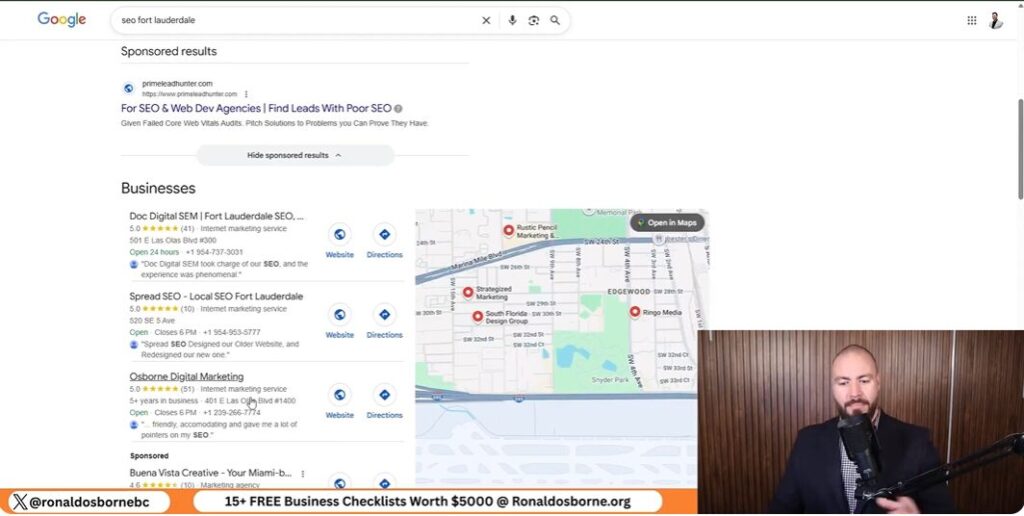
Scrape Google Reviews
Scrape Google Reviews

When I started using this review analysis tool, I wanted a quick way to figure out what customers really thought about local businesses - mine and my competitors’. Instead of scrolling through endless reviews, the tool gathers them in seconds and turns that data into insights I can actually use.

As I scrape Google reviews, I can see right away how my business stacks up, what people like, and what annoys them. Looking at what competitors do well (or don’t) lets me adjust my strategy with more confidence.

The analysis goes beyond just star ratings. It finds patterns, keywords, and real chances to grow. It’s a hands-on way to tighten up my marketing, improve customer experience, and make smarter choices using real data.

Key Takeaways

Overview Of The Google Review Scraper

Tool Purpose And Main Functions

I use the Google Review Scraper to collect and compare feedback from Google Maps. It shows how my business performs against its top three competitors.

The process is quick - just copy your business URL and your competitors’ URLs into the tool. That’s it.

Key Functions:

This lets me spot what customers like, what frustrates them, and where I might be missing out.

FeatureDescription
Competitor Review ComparisonShows average ratings and counts for up to three competitors
Keyword DetectionFinds repeated words in reviews
Automatic SWOT OutputSummarizes business insights from review data

How To Get And Use The Scraper

Getting it takes less than a minute. I click the link under the video or jump to my site, scroll to the Google Maps Review Analyzer, and download it for free.

Once I’ve got it open, I:

  1. Copy each Google Maps business link.
  2. Paste my link and my top three competitors into the sheet.
  3. Let the tool do its thing and show me the insights.

The scraper and other analysis tools don’t cost anything. I get a fast look at how my business compares and where I might get ahead.

How To Use The Google Review Scraper

How To Use The Google Review Scraper

Entering Business And Competitor Details

I start by grabbing the web links for my business and three main competitors from Google Maps. I always use the full URLs, not just names, since similar names can trip up the tool.

  1. Open Google Maps.
  2. Click the business name.
  3. Copy the URL from the browser bar.
  4. Paste each one into the sheet, like this:
FieldExample Entry
My Businesshttps://maps.google.com/examplebusiness
Competitor 1https://maps.google.com/competitor1
Competitor 2https://maps.google.com/competitor2
Competitor 3https://maps.google.com/competitor3

Once I enter the info, the scraper jumps in and starts pulling the Google reviews.

Moving Through The Dashboard

After the data loads, I move to the dashboard to compare things like average rating, total reviews, and star distribution.

The dashboard gives me:

The tool also runs a SWOT analysis automatically, splitting strengths, weaknesses, opportunities, and threats. If reviews mention slow paperwork or lousy communication, I mark those as weaknesses. If lots of people praise project results, that goes in strengths.

It’s pretty clear where competitors shine - and where I need to step up my own service.

Competitor Analysis For Local SEO
Competitor Analysis For Local SEO

Finding Gaps And Growth Areas

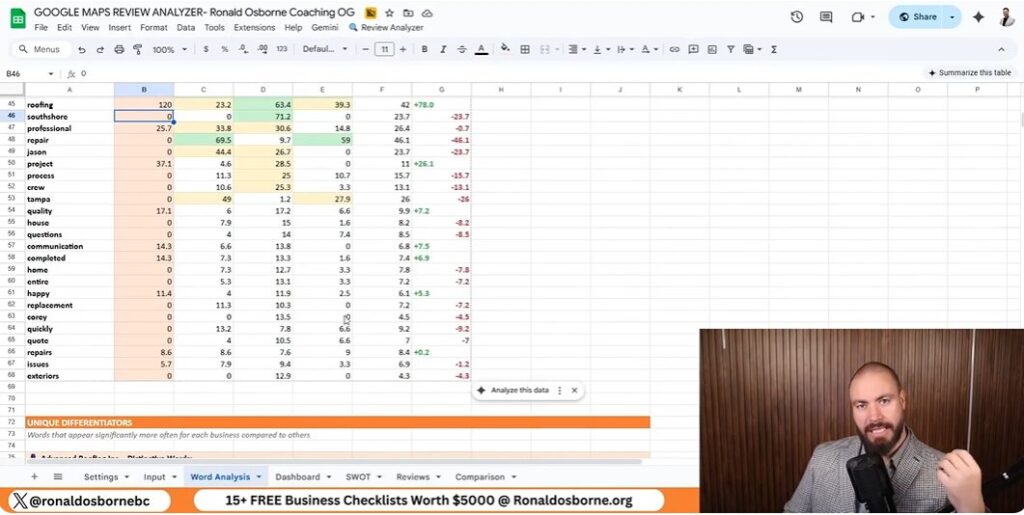
I use a Google review scraping tool to analyze local competitors. It pulls reviews from the top three businesses in my area and sets them side by side with mine.

After I paste each company’s URL, the system grabs review data and runs a full analysis automatically. The results show star ratings, total reviews, and sentiment spread for both good and bad comments.

This helps me spot where competitors stumble - like repeated complaints or slow service. I can also see keywords that pop up most, which tells me what customers really care about.

FactorMy BusinessCompetitor ACompetitor BCompetitor C
Average Rating4.24.84.64.1
Total Reviews320500410280
1-Star Reviews (%)7%3%4%9%

I look for patterns in the bad reviews. If customers keep mentioning paperwork delays or slow communication, that’s a red flag. Every negative comment is a lesson in what not to do - and where I can do better.

Measuring And Comparing Results

Once the tool finishes its scan, it builds a SWOT-style dashboard for me. It lists strengths, weak spots, opportunities, and possible risks based on the words and tone in real reviews.

CategoryInsight Example
StrengthsCustomers mention strong project management and skilled crews
WeaknessesComplaints about delayed paperwork and slow follow-up
OpportunitiesPromote positive feedback from consultants and property owners
ThreatsOverdependence on a single key staff member

If others get praise for “professional crews” or “quick project turnaround” and I never see those words in my reviews, I know I’ve got work to do. These insights help me sharpen my local SEO strategy because they show me which keywords and experiences matter most to local customers.

Automated Data Insights
Automated Data Insights

Text And Context Keyword Review

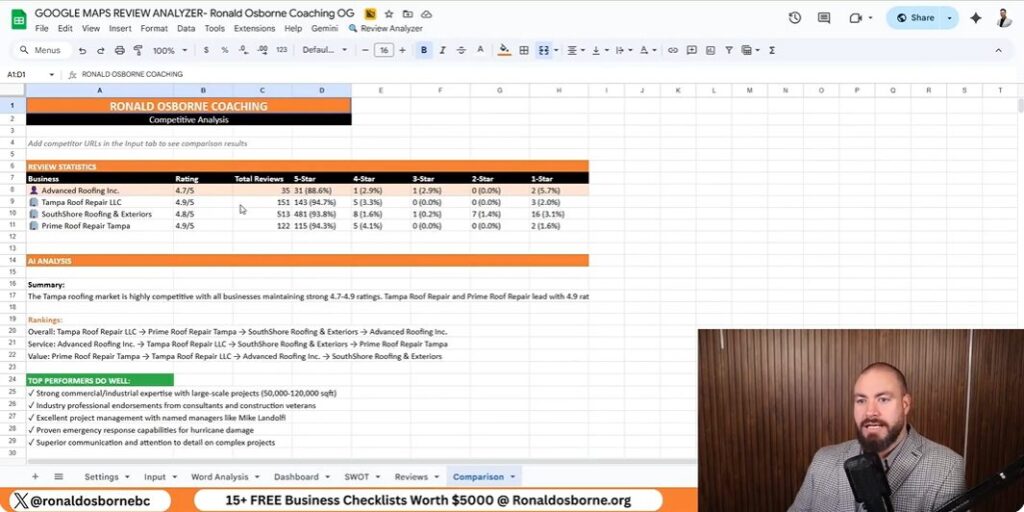
I use the review analyzer to scan Google reviews from my business and my top three competitors. The tool grabs every review, spots repeated words, and groups similar terms together.

It shows me how often words pop up and how they tie into customer sentiment. For example, words like professional, repair, or crew might show up more in a competitor’s feedback. I can see which terms build trust or show service quality - and where my reviews might be lacking.

Example MetricMy BusinessCompetitor ACompetitor B
Reviews Analyzed200310285
Common Positive Termsproject, reliable, teamcrew, fast, helpfulclean, responsive, detailed
Common Negative Termsdelay, paperworkcost, miscommunicationtiming, incomplete

These insights help me tweak my messaging and services so customers use stronger, more consistent keywords about my business.

Dashboards And Comparison Features

The dashboard puts all the collected data in one spot. I can quickly check ratings, total reviews, and average stars across competitors.

Graphs and tables show which business leads in each area. The automated SWOT report breaks out Strengths, Weaknesses, Opportunities, and Threats based on the language in reviews:

The breakdown gives me a roadmap for what to keep, what to fix, and where to push harder. The data and visuals turn customer feedback into steps I can actually take right now.

SWOT Analysis Integration

SWOT Analysis Integration

Positive Factors And Growth Possibilities

As I use my tool to scrape Google reviews, I can quickly spot where my company stands out compared to local competitors.

The automatic analysis highlights project management as a strong area, and customers mention it often in their feedback.

The tool also uncovers new opportunities.

For instance, reviews from consultants and property managers show strong satisfaction, so I can use their testimonials in future marketing.

It also points out patterns, like a growing interest in solar or green technologies - maybe that’s something worth exploring for expansion.

Strength/OpportunityAction Step
Excellent project managementFeature success stories on the website
Trusted by consultants and property managersUse testimonials in campaigns
Green technology interestAdd eco-friendly options to services

Challenges And Possible Risks

The analysis reminds me that some internal issues need attention.

Delayed paperwork and slow administrative processes frustrate customers, and poor communication during projects stands out as a weakness.

Another risk is relying too much on key team members.

Customers often mention one specific employee by name, which shows trust but also means I should train others to keep things stable.

Weakness/ThreatAction Step
Administrative delaysStreamline office tasks with digital tools
Poor communicationCreate clear client update routines
Dependence on key staffCross-train team members to share workload

Practical Applications For Businesses

Practical Applications For Businesses

Strengthening Customer Confidence

I use the review analyzer to figure out what customers value most.

The tool scans every review and highlights the words that show up a lot, giving me a real sense of what people talk about.

This helps me see if customers feel positive or negative about my business compared to others in the area.

Data PointInsight Example
Frequent Terms"Professional," "Project," "Team"
Customer ToneMostly positive with concerns about speed
Action StepImprove project time communication

When I see repeated concerns - like slow response times or unclear communication - I try to address them right away.

Staying on top of what customers mention helps build trust and keeps satisfaction up.

Managing Public Image Effectively

Comparing my company’s reviews to top competitors helps me spot weak spots that could hurt my brand’s credibility.

The automatic SWOT report pulls out strengths, weaknesses, opportunities, and threats based on what customers actually say.

Examples of insights include:

I use the data to improve staff training and refine processes, making sure the company’s image stays steady in search results and client feedback.

Getting Further Support

Viewing Client Feedback

You can see how I’ve helped others reach their business goals by checking the client feedback on my website, ronaldosborne.org.

I include both written and video testimonials that show real results from people and teams I’ve coached.

TypeDescription
Video ReviewsShort clips where clients talk about their growth and results
Written ReviewsComments and feedback available below the videos

These examples give you a clear idea of how my strategies have worked in different industries.

Reaching Out To Me

If you want help improving your business or want to dig into how the Google review scraper works, just reach out to me directly.

  1. Head over to ronaldosborne.org.
  2. Click to book a free discovery call.
  3. Pick a time that actually works for you.

On our call, we’ll chat about your business goals and how to scrape Google reviews effectively. We can also look at a few tools that might make your workday a little smoother.

How To Get Lawn Care Clients

How To Get Lawn Care Clients

I built my landscaping business with my brother from scratch, so I know firsthand how tough it can be to find and keep clients in this field. Over time, I realized that skill alone isn’t enough - you’ve got to build trust, reach out the right way, and use smart tools to connect with people.

Let me share what’s actually worked for me. These are practical, hands-on methods on how to get lawn care clients, not just theory.

The strategies I’ll lay out are all about credibility, lead generation, and clear communication. Whether you’re brand new or trying to grow your business, these steps can help you build a steady stream of clients. You might even turn your effort into real results.

Key Takeaways

Building Credibility For Your Lawn Care Business

Displaying Your Results

I always show potential clients proof of what I can do. Clear before-and-after photos make a big difference and speak for themselves.

When I meet new leads, I bring my tablet with photos neatly organized so people can see my work right away.

Type of PhotoPurpose
BeforeShows starting condition
AfterDisplays results and skill
Wide ShotHighlights full property
Close-UpShows detailed quality

Even a handful of solid examples can leave a strong impression in just a few minutes.

Sharing Client Feedback And Success Examples

People trust you more when they hear others do too. I collect short, honest quotes from happy customers and include their names and what they do - like realtors or business owners.

Example list:

I’ll also mention simple case examples, like boosting curb appeal for rentals or keeping big commercial lawns neat. These real-life stories show what I can do without sounding like I’m bragging.

Building a Strong Online Profile

I keep my website clean and professional. It has photos, reviews, and contact info so clients can reach me easily.

I update it often so people know I’m still active. Social media helps too - I share project photos and customer comments. When someone searches for lawn care in my area, they see a consistent, reliable image. I always double-check that my contact form, phone number, and address are up to date.

Lead Generation Strategies For Lawn Care Companies

Lead Generation Strategies For Lawn Care Companies

Using Free Lead Tools

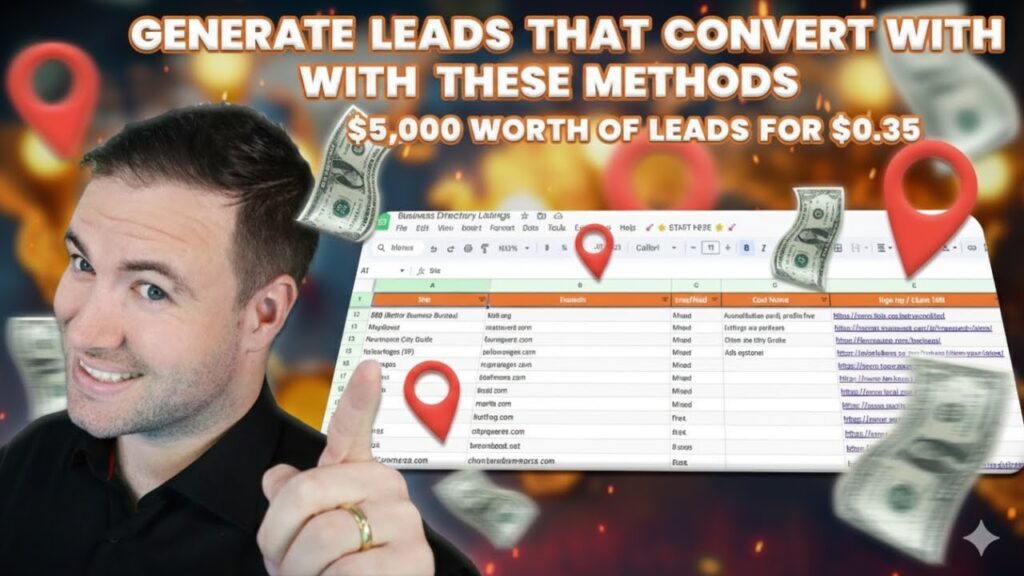
I built a free lead generation sheet that helps me find tons of potential clients without spending a dime. The tool scans online listings and grabs contact details for each result.

Once I run it, I get business names, emails, phone numbers, and addresses. Then I can call, email, or even visit them.

Tip: If you’re using a free tool like this, keep a short sales script handy. Have your before-and-after photos ready to go - trust builds fast when you show real results.

StepActionTime Needed
1Open the lead generator1 minute
2Enter industry and location30 seconds
3Click “Find Leads”1 minute
4Review and contact leadsVaries

Focusing On Certain Fields And Areas

I always narrow my search to industries and locations that make sense for lawn care. Real estate agents - especially those managing multiple properties - are great contacts since they need reliable landscapers.

I also look at roofers, medical offices, and dental clinics. These places usually want regular outdoor maintenance.

When I pick a city, I keep my list focused. If I work in Miami, I don’t bother with leads in Tampa or Jacksonville. Staying local means I can respond faster and close deals more often.

Example:

Making The Most Of Google Maps

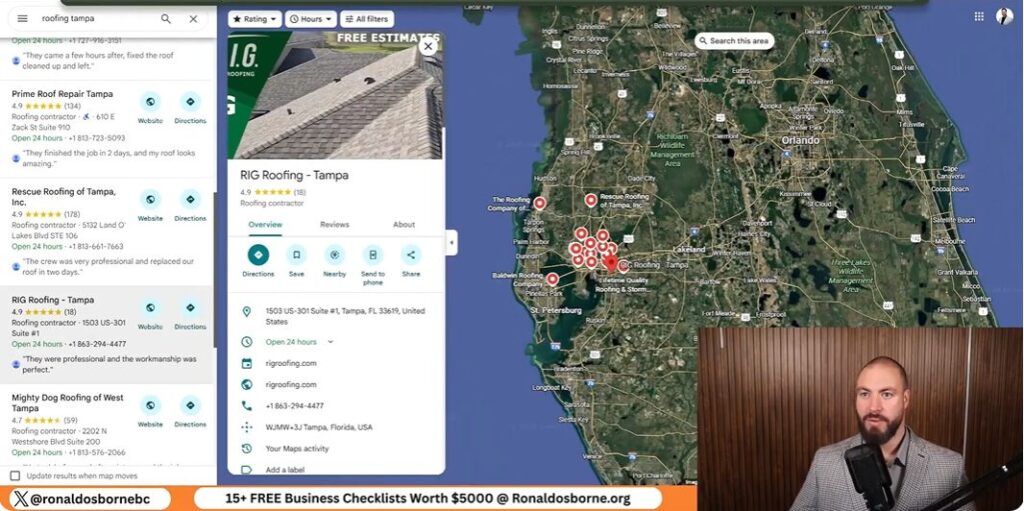
Google Maps is one of my go-to tools. I use it to find businesses in the industries I want to target. The lead generator checks Google Maps and organic results, pulling only verified listings.

Once I have the data, I check each website right from the sheet. If I’m not ready to call, I’ll email them through their contact form. When I visit in person, I dress sharp and bring my portfolio on a tablet. That personal touch often turns a quick meeting into a paying job.

Effective Outreach And Sales Techniques To Attract Lawn Care Clients

Effective Outreach And Sales Techniques To Attract Lawn Care Clients

Reaching Out To Potential Customers

I start by finding local businesses that need regular maintenance - think real estate agencies or clinics. They usually manage several properties. I use a lead generator to grab contact details by location and industry, then reach out by phone, email, or in person.

MethodBenefit
EmailEasy to send portfolio and photos
Phone CallBuilds trust with your voice
Visit in PersonShows confidence and professionalism

Building A Clear And Attractive Offer

When I reach out, I lead with results. I talk about lawns I’ve improved and show before-and-after photos. That builds credibility fast.

I keep my pitch short, focus on the value I offer, and explain how my work saves clients time and boosts curb appeal.

Example points to include:

Showing A Professional Appearance

How you present yourself matters. I wear clean, neat clothes and bring a tablet or folder with my best work. People size you up fast, so I make sure I look organized and serious.

Whether I’m at their office or knocking on their door, I keep my tone friendly but confident.

Appearance ElementWhy It Matters
Neat outfitSignals reliability
Portfolio tabletShows quality clearly
Polite greetingMakes a good first impression

Utilizing The Ronald Osborne Lead Generator

Utilizing The Ronald Osborne Lead Generator

Getting Started With The Tool

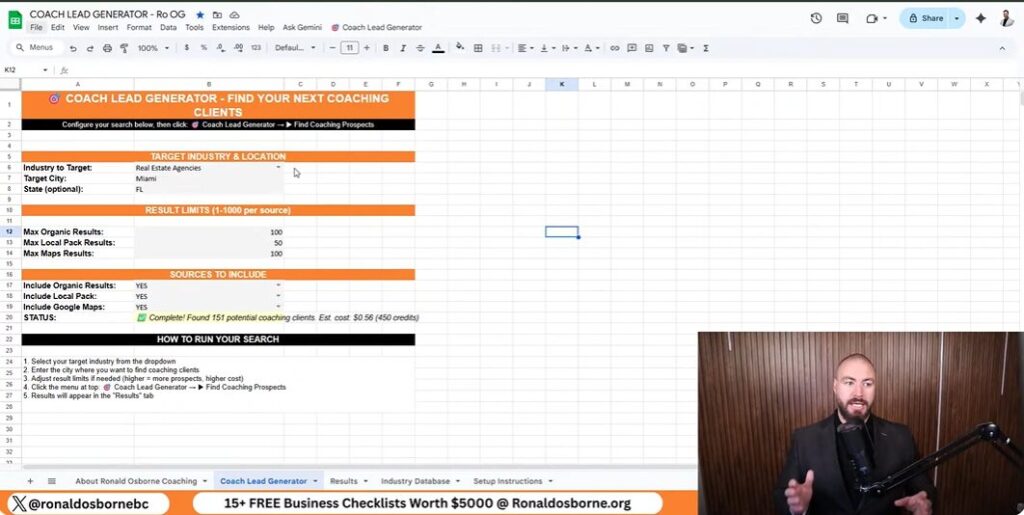
I built my lead generator to help business owners find clients quickly without paying for ads. To use it, go to RonaldOsborne.org and open the Client Lead Generator. The template is ready to go - totally free as you explore how to get lawn care clients.

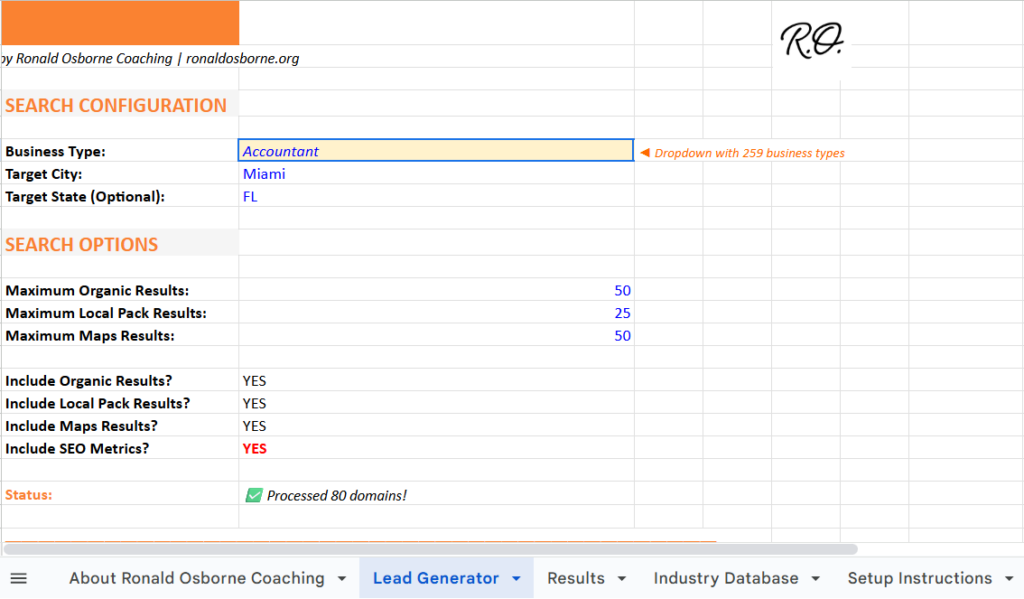
Just enter your industry and location. For example, I might pick Real Estate Agents in Miami. If you’re searching a big city, keep it under 400 leads so it stays accurate. Once you set your filters, hit Find Leads. In about a minute, your list shows up in the results tab.

StepActionTip
1Visit the site and launch the toolNo login or payment needed
2Enter industry and cityKeep searches local
3Click “Find Leads”Wait about 1–2 minutes
4View results tabReview and save your leads

Organizing And Refining Contacts

When the search finishes, you’ll see company names, websites, phone numbers, and addresses. Use this info to start your outreach. I add potential clients to a simple spreadsheet to track calls, emails, and visits.

If you prefer email, visit each company’s contact page for direct addresses. For in-person work, plan a few short visits each day. Keep your credibility materials handy - photos, reviews, and a clear pitch.

Boosting Contact Results

If you want the best results, you’ve got to stay consistent. I suggest spending at least two days reaching out to new leads. If you show up prepared - with a clean look and professional attitude - you’ll stand out.

Use a short, clear intro when calling or visiting. Mention your service, show proof of past work, and explain how you can help. If you try this and don’t see progress in two days, I’ll give you a free one-hour call to review what happened and help you adjust.

Client Communication Strategies

Client Communication Strategies

Email And Phone Outreach

I reach out to potential clients directly using the leads I find. Every listing gives me phone numbers, email addresses, and websites.

I usually check their sites for a contact page first. Then I'll send a short, professional message about my lawn care services.

When I call, I keep things direct and polite. I mention the types of properties I work on and point out a few examples of my results.

Honestly, a clear and confident tone goes a long way. People seem more willing to listen when I sound sure of myself.

MethodPurposeTip
EmailStart communication with photo samples or short introductionsAvoid long paragraphs
PhoneBuild personal trust quicklyUse a calm and professional voice

In-Person Networking

I make sure to dress neatly and carry my portfolio or tablet. I stop by local businesses from my lead list and introduce myself.

Walking in shows a bit of confidence and effort, I think. Real estate agents and property managers often need regular maintenance, so I always bring before-and-after photos to show them.

Greeting people by name - if I know it - helps. Face-to-face communication just builds credibility so much faster than online stuff.

Checklist before visiting:

Effective Follow-Up Methods

After first contact, I follow up within two or three days. If we spoke by phone, I send a quick thank-you email.

If I met them in person, I send another message with more photos or a short reminder of our conversation. Keeping track of who I contacted helps me avoid confusion.

I use a basic spreadsheet to jot down responses and plan my next move. Here’s the follow-up pattern I stick to:

  1. Initial contact
  2. Email or call within 3 days
  3. Message again in 1 week if no reply
  4. Stop after 3 attempts without interest

Support And Continued Learning

Scheduling A Free Call For Guidance

I offer a free 15-minute consultation where we can talk about your progress and what you should try next as you explore how to get lawn care clients. During the call, I give practical tips for lead generation, building trust, and managing your marketing budget.

What to prepare before the call:

You can book this session right through my website.

Joining Our Private Facebook Network

I’ve set up a free Facebook group where business owners can ask questions and get support. I check the group often and personally answer posts, so your questions won't get buried.

Inside, members usually:

If you want quick answers or advice, post in the group instead of leaving a comment somewhere else - I always reply there.

Connecting With The Wider Online Network

The online community lets you learn from others who are testing out the same methods. People often post the exact steps and results they get using the free lead generator.

Here are a few ways to stay active:

  1. Jump into the comments on posts about new strategies.
  2. Share your own progress with the tools, even if it’s messy.
  3. Ask questions about marketing in your area - someone probably has an answer.

Staying active means you’re more likely to pick up fresh techniques. It also makes it easier to keep your growth efforts on track.

Free Brand Monitoring Tool

Free Brand Monitoring Tool

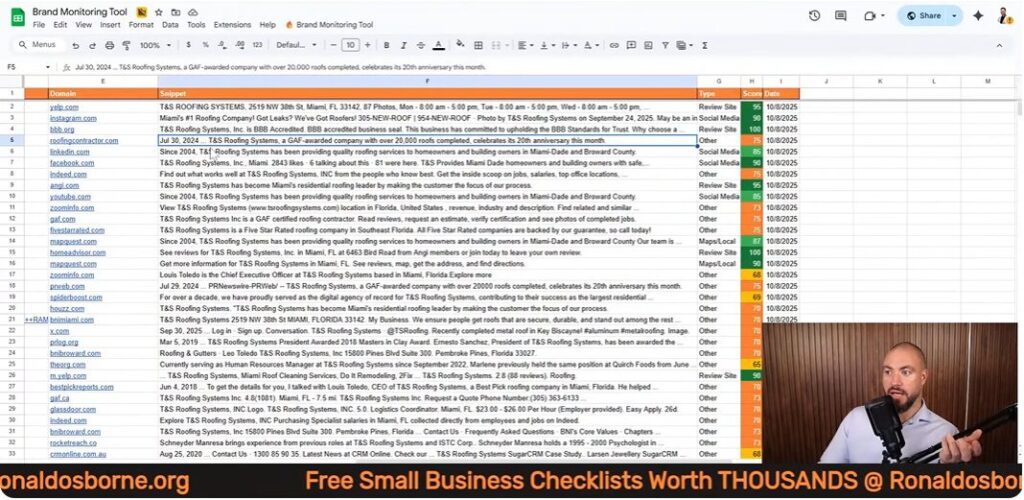
When I first started tracking how my competitors showed up online, I wanted something simple. I built a free brand monitoring tool that connects with Google Sheets and pulls mentions from places like Yelp, Instagram, and industry directories.

With just a few steps, I can see where any company is listed. That information helps me strengthen my own online presence. This free brand monitoring tool doesn’t need technical skills or coding. I just enter a business name and website, tweak a couple settings, and it collects results automatically.

It sorts listings, filters out duplicates, and ranks sources by relevance. That makes it easier to see how competitors build visibility.

Key Takeaways

Overview Of The Free Brand Monitoring Tool

Main Functions

I built a free spreadsheet tool to track where a business or competitor appears online. It works inside Google Sheets and uses an API call to collect results from different websites and social media platforms.

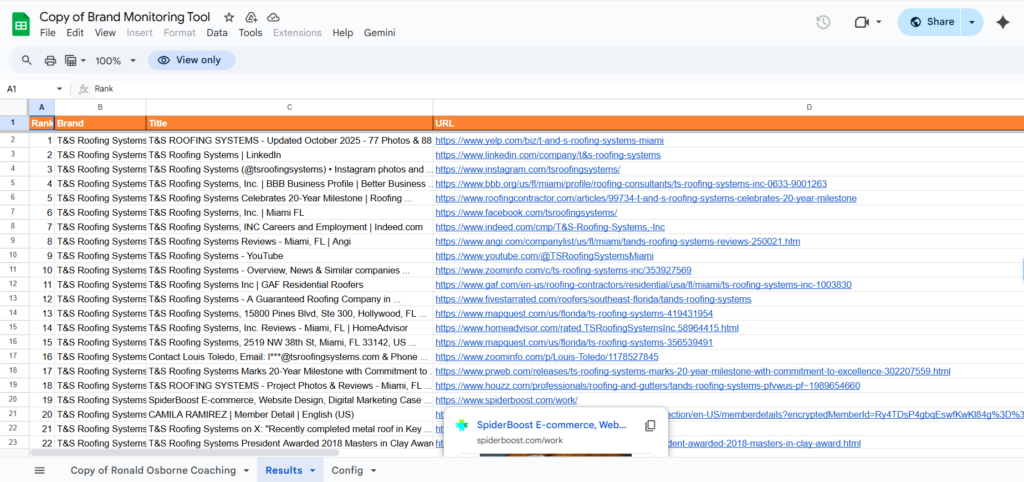
I can enter a brand name and its domain, and in just a few minutes, the sheet lists up to 500 mentions from sources like Yelp, Instagram, and industry directories.

ColumnDescription
RankOrder of results found
BrandThe company name entered
TitlePage title pulled from the web
URLDirect link to the mention
TypeSource type (social, review, or directory)
ScoreColor-coded rating to identify valuable listings

The setup just needs a valid API key and a few basics in the config file. I make sure to strip any extra text from the domain and use the right business name for accuracy.

Advantages Of Monitoring Your Brand

Using this tool helps me compare my brand’s visibility with others in my industry. I can quickly spot which sites list my competitors and find new places to build my own presence.

Getting Access To The Brand Monitoring Tool

Getting Access To The Brand Monitoring Tool

How To Get The Tool

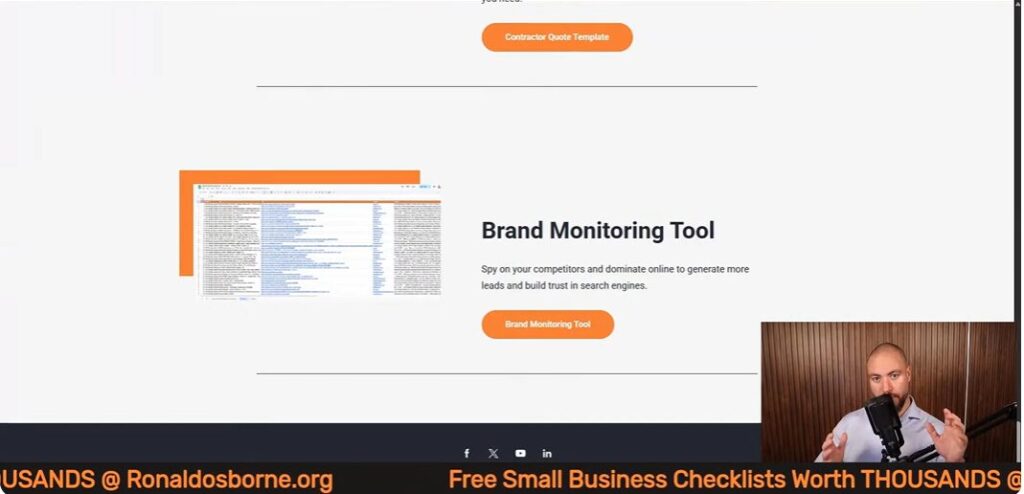
I made this brand monitoring tool available as a Google Sheet. You can grab it by heading to ronaldosborne.org and opening the Brand Monitoring Tool page.

A direct link sits under the video. Once you open the sheet, you’re good to go - no download or payment needed.

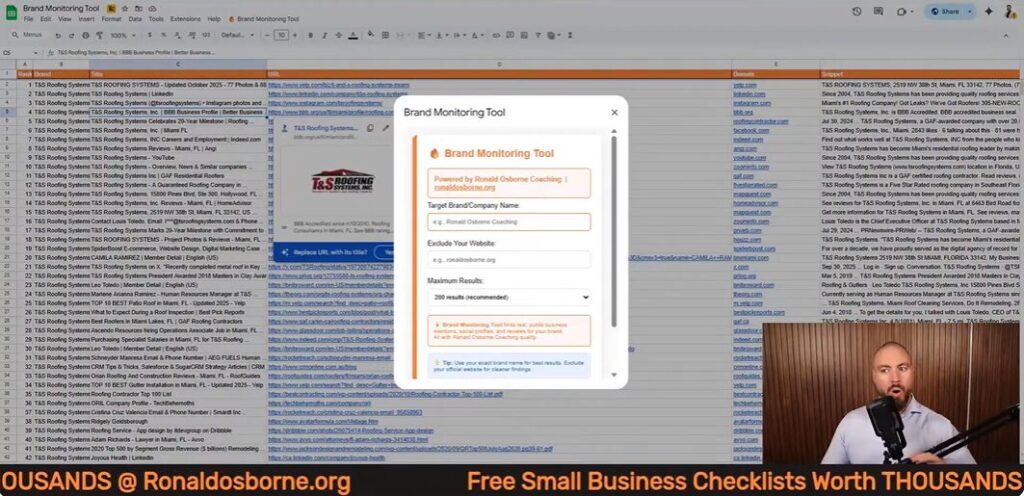
To check your competitor, just enter their business name and domain (like businessname.com). Don’t include https:// or slashes. The sheet will search sites like Yelp, Instagram, and industry directories, showing up to 500 results.

StepActionExample
1Go to the shared sheet linkronaldosborne.org
2Enter competitor’s website (no https://)examplecompany.com
3Type the exact business nameExample Company
4Click “Start Brand Monitor”Runs search automatically

API Connection Setup

The tool connects to data sources using an API key. I’m not a coder, so I made this part easy. There’s a short setup video linked under the sheet, and it only takes about two minutes to get your API key.

Google gives you $200 in free API credits every month. That’s plenty for normal use, even if you run hundreds of brand searches. After you get the key, just open the config file, paste it into the right cell, and save. The system’s ready to go with no extra hassle.

No Technical Experience Required

You don’t need coding or IT skills. I built this for people like me who want quick results without touching code.

Just fill in the name and domain, hit one button, and watch the data show up. The layout keeps everything clear, showing results by rank, URL, and category.

If you spot duplicates, you can filter them out in seconds. I wanted tracking competitors to feel straightforward and quick.

Setting Up The Tool

Setting Up The Tool

Adjusting The Spreadsheet

I open the Google Sheet through my website. Once it loads, I check that the configuration tab is visible. This tab connects to an API that pulls data from online sources.

No coding required - Google’s free monthly credits cover the cost. The sheet can pull up to 500 brand mentions in one go, so it works for wide searches.

Steps I follow:

  1. Go to the configuration file.
  2. Paste the API key in the right cell.
  3. Save changes and return to the main sheet.
ColumnPurpose
BrandName of the business
DomainMain website URL
TypeSource category (social, directory, etc.)
ScoreRelevance indicator

Entering Business And Website Details

Next, I type in the target company’s official name and website domain. I strip away extras like “https://” or “www.” so only the base domain remains, like domain.com or domain.com.au.

I avoid nicknames or brand variations. For example, using Ronald Osborne instead of Ronald Osborne Coaching gives more accurate results. I double-check the correct version on the company’s About or Contact page.

Once I enter that info, I hit the Start Monitor button. A message pops up to show the search has started. The system runs several queries, collecting social media links, review pages, and industry directories.

Best Practices For Clean Data Entry

Keeping entries neat and the data organized helps this free brand monitoring tool run smoothly and gives better results.

How The Brand Monitoring Tool Works

How The Brand Monitoring Tool Works

Starting A Brand Lookup

I open the spreadsheet and enter two details - the company’s name and its main domain. I strip away any extras like “https://” or slashes, so it’s just the domain, like example.com.

Then I hit Start Monitor and the sheet starts searching across the web. The system connects through a free API and returns up to 500 entries.

I can pick how many to load - 100, 200, or more - depending on how deep I want to dig.

Categories Of Online Appearances Tracked

The search checks several sources all at once. It looks through:

Each result comes with a label for the source type, which helps me filter and organize everything.

Source TypeExample SiteCommon Use
Social MediaInstagram, XBranding and content
Review PlatformYelpCustomer feedback
Industry ListingRoofingContractor.com, GAFTrade credibility

Reading And Using The Results

Once the search wraps up, the sheet displays several columns:

I can filter or sort the data to find duplicates or zero in on the listings that matter. Green-scored entries highlight strong opportunities for building or improving a brand’s online presence.

Interpreting And Filtering The Results

Interpreting And Filtering The Results

Reading The Data Columns

When the search wraps up, I notice a few columns that really stand out. Rank tells me where each result lands in the list.

Brand shows the business name I searched for. Title gives me the headline from the web page.

URL links straight to the listing. I find this makes skimming a lot easier.

The Type column labels each entry as things like social media, review site, or industry listing. This helps me group sources quickly.

Sometimes I filter the data to focus on just one category. Other times, I compare different platforms side by side.

ColumnDescription
RankLists the result order
BrandCompany or name searched
TitlePage headline or name pulled from the site
URLDirect link to the page
TypeSource type (social, review, industry)
ScoreRelevance or priority level

Prioritizing Listings With Scores

The Score column helps me figure out which opportunities are worth my time. I keep an eye out for results marked in green since those are usually the most valuable.

Trusted directories or big social pages tend to boost brand visibility. When I’m comparing competitors, I go straight to the top-scoring entries.

I jot down any platforms they’re using that I’ve missed. Then I add those to my own plan, no shame in borrowing good ideas.

Example priority list:

  1. High-score social profiles
  2. Well-known review sites
  3. Industry-specific directories

Spotting Repeat Entries

Sometimes the sheet pulls in duplicate listings. Yelp or LinkedIn pages might show up more than once because their URLs can be quirky.

I check the domain part of the link to see if two entries are actually the same. If so, I remove extras to keep things tidy.

This helps avoid confusion later when I’m counting total mentions. Every valid URL should be unique, so I can match each listing to a different source.

Pros And Cons Of The Brand Monitoring Tool

Pros And Cons Of The Brand Monitoring Tool

Benefits

I built this tool to quickly spot where a brand or competitor pops up online. It hooks into an API and connects through Google Sheets, so I can track listings across places like Yelp, Instagram, and industry directories.

Key Strengths include:

FeatureBenefit
API connectionPulls accurate, real-time listings
Scoring systemHelps identify important mentions
Free monthly creditsRemoves cost concerns
Built-in filtersSpeeds up analysis

Drawbacks

The tool saves me a ton of time, but it’s not perfect. Sometimes it includes duplicate links, especially from review sites like Yelp.

I have to clean up extra entries now and then. It also caps results at about 500 listings per run, so if you work with huge brands, that can feel limiting.

Occasionally, the data takes a few minutes to load while the tool does its thing. Nothing’s ever instant, right?

Limitations to keep in mind:

Best Practices For Competitive Analysis

Using Data To Strengthen Brand Position

I use a simple spreadsheet tool to track where competitors show up online. It lists their profiles on social media, review sites, and industry directories.

When I enter their name and domain, I see all their public mentions in one place. I focus on clean, accurate inputs - the business name should match exactly what’s on their website’s “About” page.

I strip out prefixes like “https://” and endings such as “/home.” That way, the system only searches the right domain.

To spot the best results, I use color-coded scores.

This format makes it easy to spot credible platforms where my brand should show up, too.

Listing TypeExample SourceValue for a Brand
Social MediaInstagram, LinkedInBuilds public presence
Review SitesYelpImproves local trust and visibility
Industry SitesTrade or supply directoriesStrengthens professional credibility

Tailoring Methods For Each Market

Every industry has its own digital spaces. When I look at competitors, I check if they’re listed on trade-specific platforms.

Roofing businesses, for instance, should show up on supplier directories run by material manufacturers. That’s just one of those small details I like to catch early.

This strategy helps me figure out which authoritative sites really matter in a field. If I see a competitor on an official partner page, I usually try to land a similar spot myself.

Even this free brand monitoring can reveal these opportunities if you poke around enough. I’ll often compare hundreds of results - sometimes up to 500 mentions - to spot patterns.

Duplicates do pop up, but filtering them lets me zero in on genuine insights and cuts out the noise.

How To Generate B2B Leads

How To Generate B2B Leads

When I first started building my business, I realized pretty quickly how crucial it is to find the right leads. Over time, I came up with a simple system that helps spot potential clients using clear data and straightforward tools.

Now, I keep everything efficient and affordable with a structured sheet that sorts leads by industry and location.

In this session, I’ll walk you through how I find and analyze business opportunities online. I’ll also show you how to generate B2B leads and reach out to potential clients once I’ve got their details lined up. This saves time, cuts costs, and lets business owners focus their energy where it actually matters.

Key Takeaways

Essential Tools For B2B Lead Generation

B2B Lead Sheet Breakdown

I use a simple lead sheet that pulls business data straight from Google. I can search by industry and location to zero in on exactly who I want to target.

The sheet grabs info like business name, website, phone, address, rating, and where they show up on Google.

Here’s a quick look at what the sheet includes:

FieldDescription
Business NameThe name of the company
Website URLDirect link to the company’s site
Phone NumberContact number for outreach
AddressBusiness location
CategoryType of business or service
Google RankTheir position in search results
ReviewsNumber of customer ratings

To get started, I fill in the industry, target city, and state. I always use capital letters for location names so the system reads them right.

Then I pick how many results I want - up to 1,000. After that, I hit the Find Prospects button, and in just a few minutes, the sheet spits out a list of potential clients ready for contact.

Getting Free Business Materials

Anyone can grab this lead sheet and some free tools from my website. I include a business checklist, goal templates, and access to over 250 listing sites that help boost online visibility.

These resources make it easy to set goals and attract more leads without spending extra cash.

To download them, just head to my site and scroll to the section with the free templates. Once you’ve got them, you can use the tools right away.

Setting Up The Lead Generation Sheet

Setting Up The Lead Generation Sheet

Setting Up Industries And Regions

I start by opening the Lead Generator tab. This is where I pick what kind of businesses I want to find and where to look.

For example, maybe I want to search forrestaurants in Fort Lauderdale, Florida. I type the industry and location in capital letters, like this:

FieldExample Entry
IndustryRESTAURANTS
CityFORT LAUDERDALE
StateFL

Capital letters help the sheet avoid errors and pull accurate data. It’s a small thing, but it makes a difference.

Fine-Tuning Sheet Entries

Next, I tweak the available fields to match the search scale I want. I can set the maximum results, map pack limit, and local result count.

Here’s a sample setup I use a lot:

SettingValue
Max Results1000
Map Pack Limit150
Local Results100

These limits help me control how much data I pull. Once everything looks right, I click Find Coaching Prospects and let it run.

The sheet updates in real time at the bottom with progress and any errors, which is handy if something goes sideways.

Adjusting Search Filters

I change the search terms and phrases in the query fields to target specific markets. Sometimes I swap in real estate agents, or maybe roofing contractors or flooring companies.

The sheet combines the industry and region filters automatically and calls the API to fetch the data.

When it’s done, the results include:

This data lets me quickly spot which companies fit my target profile so I can reach out or tweak my search further.

Using Google For B2B Lead Extraction

Using Google For B2B Lead Extraction

Using Google Maps And Search Results

I use Google Maps and standard search results to find and target business leads. By plugging in the right keywords and narrowing by location, I can pull detailed info about companies in a specific industry or area.

This helps me find key prospects, like real estate agents or restaurant owners, without burning through my budget.

I rely on industry terms and city or state names in my searches. For example, typing “restaurants Fort Lauderdale Florida” brings up local listings with accurate business details.

Google Maps gives me contact numbers, addresses, and even customer ratings, which is great for sizing up a business before reaching out.

Pulling Essential Business Information

Once I run my lead generation sheet, it organizes all the Google data into an easy format. The sheet lists key details like:

ColumnDescription
Business NameThe company’s name as it appears online
Website URLDirect link to the business site
Position on GoogleSearch ranking or placement
Phone NumberContact number for outreach
AddressPhysical business location
CategoryType of business or industry
Ratings/ReviewsPublic score and feedback

I always capitalize each city and state name before running the search to keep results accurate. I can adjust the number of results - maybe 150, maybe 1,000 - and the tool wraps up the search in a few minutes.

Then I review the data to see which businesses might need help improving their reach, and I contact them directly using the info I’ve pulled.

Analyzing And Engaging Prospects

Analyzing And Engaging Prospects

Reviewing Lead Details

I use a lead generator sheet that pulls business data by location and industry. It grabs company names, websites, addresses, categories, ratings, and contact numbers. This is an important process in exploring how to generate B2B leads.

This helps me spot who ranks high or low in Google results and what areas might need a boost.

Data CollectedExample
Business NameSmith Roofing Ltd
Websitewww.smithroofing.com
Address22 Main St, Miami, FL
Reviews45
CategoryRoofing Services

When I review these results, I look for things like total reviews or missing info. If I see low review counts or bad rankings, I make a note to bring that up when I reach out.

Contact And Follow-Up Methods

Once I have the data, I reach out directly - usually by phone or email. I use the info I’ve gathered to make my approach specific to each business.

I refer to the data while talking. For example, if a local business has way fewer reviews than a competitor, I’ll point out the difference and talk about ways to catch up. It keeps the conversation practical and actually helpful.

Broadening Lead Generation Options

Broadening Lead Generation Options

Reaching More Platforms For Business Listings

I make sure to list businesses on hundreds of online directories so I can open extra channels for leads. When a company shows up on more sites, more people find it - no ads or cold outreach needed.

Here’s a quick rundown of what I focus on:

StepActionPurpose
1Add business details to 250+ listing sitesBoost search visibility
2Keep contact info consistentBuild trust and make updates easier
3Check listings monthlyEnsure accuracy and performance

This multiplies exposure and brings in steady traffic from people already looking for services like yours.

Making Use Of Extra Templates

Along with the lead sheet, I share several free templates that save time and help track results. These tools make organizing tasks simpler and give structure to follow-up efforts.

I often use:

Using these templates keeps my process organized. I can handle more leads efficiently across different campaigns, and honestly, it just makes life a whole lot easier.

Maximizing Value With Ronald Osborne Coaching

I help business owners find new clients using low-cost, practical tools. My guide on how to generate B2B leads sheet pulls data straight from Google Maps and search results to spot potential clients in any location or industry.

It’s easy to use and doesn’t take long to set up. You just enter theindustryandgeographic areayou want to target.

Data TypeInformation Collected
Business NameStraight from Google results
Website URLDirect domain link
Contact InfoPhone number and address
CategoryBusiness type or field
Ratings And ReviewsBasic performance insight

The sheet automatically lists potential leads after you run it. You can reach out to these businesses, compare ratings, and start meaningful conversations about growth.

The data lets you personalize your outreach and focus on those most likely to respond. I also throw in free tools like smart goal templates and listing checklists.

These help you get your business on hundreds of directories and boost visibility while saving cash. Everything’s streamlined, so you can skip the guesswork and actually focus on what grows your revenue.

How To Get Clients

How To Get Clients

Picture this: I'm standing in front of a packed room, asked on the spot how I landed my first major marketing client. Sweat? Oh, buckets. The secret sauce, as it turns out: real credibility, guts, and knowing how to wield the right lead generation tools without blowing your budget. Forget the generic advice the internet peddles - this is my uncensored, how-I-actually-did-it rundown. From the days of door knocking (yes, with grass-stained knees) to the first time my inbox flooded with leads, I'll unravel the strategies on how to get clients and resources that fueled millions in my businesses and clients'. You ready to skip the fluff and get clients? Let's dive in, human-style.

TL;DR: If you're after clients and not empty promises, focus on building real credibility, use proven free (and cheap) lead generation tools, master the outreach game, and always - always - refine your sales pitch. Don't overthink it; just get started and let experience do the heavy lifting.

Why Credibility Is Your Golden Ticket And How To Earn It

If there’s one thing I’ve learned after years of generating millions in revenue for my own businesses and clients, it’s this: credibility trumps any paid ad when it comes to landing real clients. You can have the fanciest website or the biggest ad budget, but if you can’t prove you’ve delivered results, you’ll struggle to close deals. Let me break down how you can build and leverage credibility - no fluff, just what actually works.

Show, Don’t Just Tell

I’ve closed deals simply by pointing to projects I’ve actually completed. When a potential client asks, “Have you done this before?” I don’t just talk a big game - show them real examples. Whether it’s a telecom company I built from scratch or a construction project I managed, concrete proof beats empty promises every time.

Start Small, Build Fast

If you’re new and don’t have a long track record, don’t worry. Every job - no matter how small - can be spun into a credibility asset. Did you help your buddy’s dental office get more patients? Did you assist a local roofer with their website? That counts. Document it, get a testimonial, and add it to your pitch. The key is to start somewhere and stack those wins.

Testimonials: Your Secret Weapon

Forget slick branding for a second. Testimonials from real people matter more. Even if your first testimonial is from a friend, your dentist, or a small local business, it’s gold. I’ve got feedback from everyone from contractors to the co-chair of the Florida State Bar on my website. These voices speak louder than any logo or tagline ever could.

Niche Down And Own It

Being the go-to person for a specific type of business is worth its weight in gold. If you’ve helped three remodelers in Fort Lauderdale, you’re now the remodeler expert in that area. Niche expertise makes you memorable and referable. Don’t try to be everything to everyone - own your lane.

Keep Your Proof Fresh

Once, I lost a deal because my case studies were too old. Don’t let your proof go stale - keep updating your portfolio and testimonials.

Clients want to see that you’re active and current. Make it a habit to refresh your case studies and ask for new testimonials after every successful project.

Free Client Lead Generator To Find Clients

Free Client Lead Generator To Find Clients

Let’s get real: cold lists and generic databases don’t cut it anymore. If you want to find clients who actually need your services, you need targeted, up-to-date leads - without burning through $3,000 a month on marketing. That’s why I built my free Client Lead Generator sheet. This tool is the exact opposite of those stale, recycled lists you see floating around. It lets you mine thousands of potential leads, tailored by both industry and geography, so you’re always talking to the right people.

When I started out, I didn’t have a big budget. In fact, I used to count quarters from phone booths just to pay for my first campaigns. So, I know firsthand how much a free tool can matter - especially when you’re hustling to get your first few clients. That’s why I made this sheet accessible to everyone, no matter your industry or how much you have to spend.

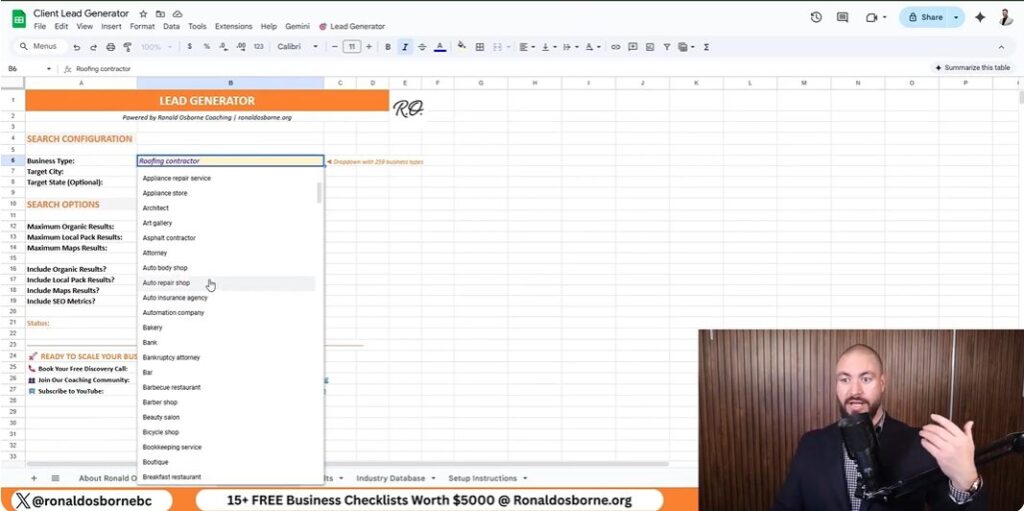
Here’s how it works: Select your industry from the dropdown (there are 260+ options), set your location, and choose how many leads you want. Hit “find leads,” and the sheet pulls up emails, phone numbers, websites, and addresses. You can even check ratings and reviews to weed out the duds before you reach out.

Don’t worry about the small fee you might see in the demo - I show you how to set it up for free using a Data For SEO API key, which comes with $1 in free credit when you use my referral link. Just enter your email and API key, and you’re ready to go.

This tool is manual, but that’s the point. You’ll know your market’s pulse better than any agency that just hands you a list. And when you reach out, always lead with your credibility - show them you’ve helped others just like them. That’s how you turn leads into real clients.

Secrets Of One-To-One Outreach: Emails, Calls, And Door-Knocking

Secrets Of One-To-One Outreach Emails, Calls, And Door-Knocking

If you want real results, you can’t be afraid to get scrappy. Forget the idea that fancy email automation or the latest AI tool will do all the heavy lifting for you. Sometimes, a simple phone call or even knocking on someone’s door beats every digital shortcut out there. In a world where everyone’s hiding behind screens, the human touch is your secret weapon.

Here’s my no-nonsense approach: I use my Client Lead Generator sheet as a literal call list. I pull up leads - let’s say remodelers in Fort Lauderdale - and before I reach out, I always check their ratings and reviews. Trust me, risky clients will drain your energy and time faster than you think. If their reviews are a mess, I move on. Life’s too short to chase headaches.

When I do reach out, I keep it awkward but honest. My opener is simple:

"Hey, I know your time’s gold. I’ve helped [insert relevant client], and I think I can help you."

This opener works because it’s real. People appreciate when you cut through the fluff and respect their time. I always lead with credibility - mentioning specific clients or results I’ve delivered. If you’re just starting out, reference any real-world wins you have, even if they’re small. Authenticity builds trust.

Here’s how I organize my outreach:

Wild card story: I once landed a $50,000 contract just by handing out business cards while jogging around my neighborhood. You never know where your next client will come from if you’re willing to put yourself out there.

Bottom line: Don’t hide behind digital walls. Use the tools - like my lead sheet - but remember, your hustle and human approach are what actually close deals. Track your outreach, learn from every interaction, and never underestimate the power of a genuine, direct connection.

Integrating AI, SEO, And Paid Ads

Integrating AI, SEO, And Paid Ads

If you’re serious about exploring how to get clients and lead generation, you need to know how to blend AI, SEO, and paid ads in a way that fits your business and budget. Here’s my no-nonsense approach, based on real-world results - not marketing hype.

SEO: The Highest ROI Channel

Let’s start with what’s worked best for me and my clients: SEO. I’m not exaggerating when I say SEO has been my ROI king. For every $1 I’ve put into SEO, I’ve seen $5 to $8 back. These aren’t inflated numbers - they’re based on actual campaigns for my businesses and clients. The key is to focus on local intent. For example, ranking for “remodeler Fort Lauderdale” or “SEO Fort Lauderdale” brings in leads who are ready to buy, not just browsing. Don’t chase broad or vanity keywords. Go after the terms your real clients are searching for in your city or service area.

Paid Ads: Fast, But Watch Your Margins

Paid ads - Google, Meta (Facebook/Instagram), and TikTok - can get you instant visibility, but be careful. For service businesses, Google Ads can work, but the return is usually tighter: $1 in, maybe $1.25 out. That’s why I recommend paid ads mainly for e-commerce or if you need leads right now. For service providers, start with Google and Facebook before even considering TikTok. Don’t spread yourself thin across every platform - double down where your audience actually hangs out.

AI-Powered Tools: Supercharge Your Outreach

AI tools, like my free Client Lead Generator sheet, are game changers. They help you:

But here’s the truth: AI can’t close deals for you. You still need to pick up the phone, send that email, or walk into their office. Use AI to save time and filter out duds, but always add your personal touch.

Channel Selection: Match Your Industry

Every industry is different. If you’re a roofer, dentist, or contractor, Google and Facebook are your best bets. E-commerce? Lean into Meta and TikTok. Always pay attention to sales intent - it’s better to rank for a niche local term that brings in buyers than to chase big, generic keywords. That’s how you get real clients, not just traffic.

Sales Skills: The Ultimate Tool Even The Best AI Can’t Replace

Sales Skills The Ultimate Tool Even The Best AI Can’t Replace

Let’s get real: you can scrape every lead on earth, but if your pitch stinks, you’re dead in the water. I’ve seen it firsthand in my own businesses and with clients across industries. You can have the best lead generation tool - like my free Client Lead Generator sheet - but if you can’t sell, you won’t close deals. That’s why sales skills are the ultimate tool, even in an age where AI can do almost everything else.

Here’s my no-nonsense approach to sharpening your sales edge:

Remember, even the best AI can’t replace the human touch in sales. Use technology to find leads and improve your process, but never skip the fundamentals. Script, practice, seek feedback, and always keep learning. If you want to win clients - especially when everyone else has the same data - your sales skills are your real edge.

Building Credibility From Zero