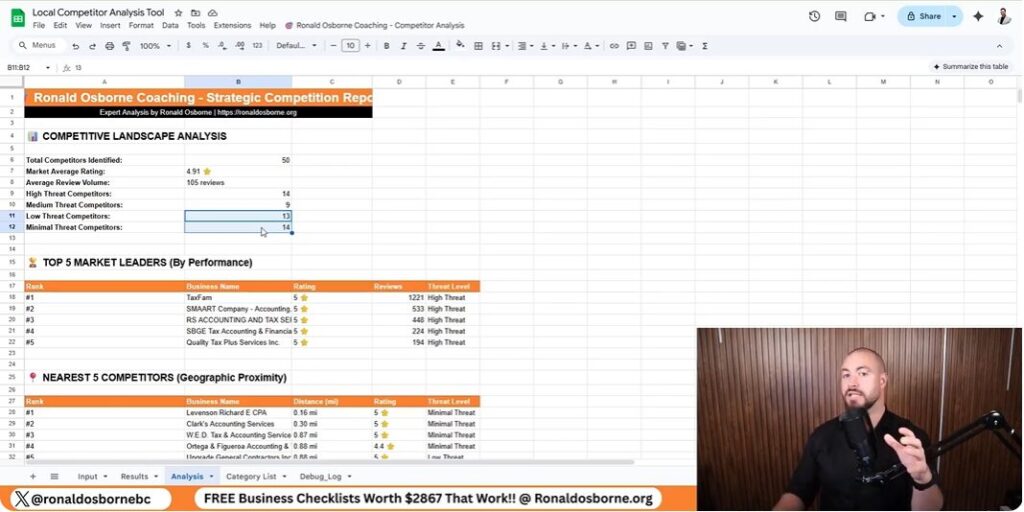
Scrape Google Reviews
Scrape Google Reviews

When I started using this review analysis tool, I wanted a quick way to figure out what customers really thought about local businesses - mine and my competitors’. Instead of scrolling through endless reviews, the tool gathers them in seconds and turns that data into insights I can actually use.

As I scrape Google reviews, I can see right away how my business stacks up, what people like, and what annoys them. Looking at what competitors do well (or don’t) lets me adjust my strategy with more confidence.

The analysis goes beyond just star ratings. It finds patterns, keywords, and real chances to grow. It’s a hands-on way to tighten up my marketing, improve customer experience, and make smarter choices using real data.

Key Takeaways

Overview Of The Google Review Scraper

Tool Purpose And Main Functions

I use the Google Review Scraper to collect and compare feedback from Google Maps. It shows how my business performs against its top three competitors.

The process is quick - just copy your business URL and your competitors’ URLs into the tool. That’s it.

Key Functions:

This lets me spot what customers like, what frustrates them, and where I might be missing out.

FeatureDescription
Competitor Review ComparisonShows average ratings and counts for up to three competitors
Keyword DetectionFinds repeated words in reviews
Automatic SWOT OutputSummarizes business insights from review data

How To Get And Use The Scraper

Getting it takes less than a minute. I click the link under the video or jump to my site, scroll to the Google Maps Review Analyzer, and download it for free.

Once I’ve got it open, I:

  1. Copy each Google Maps business link.
  2. Paste my link and my top three competitors into the sheet.
  3. Let the tool do its thing and show me the insights.

The scraper and other analysis tools don’t cost anything. I get a fast look at how my business compares and where I might get ahead.

How To Use The Google Review Scraper

How To Use The Google Review Scraper

Entering Business And Competitor Details

I start by grabbing the web links for my business and three main competitors from Google Maps. I always use the full URLs, not just names, since similar names can trip up the tool.

  1. Open Google Maps.
  2. Click the business name.
  3. Copy the URL from the browser bar.
  4. Paste each one into the sheet, like this:
FieldExample Entry
My Businesshttps://maps.google.com/examplebusiness
Competitor 1https://maps.google.com/competitor1
Competitor 2https://maps.google.com/competitor2
Competitor 3https://maps.google.com/competitor3

Once I enter the info, the scraper jumps in and starts pulling the Google reviews.

Moving Through The Dashboard

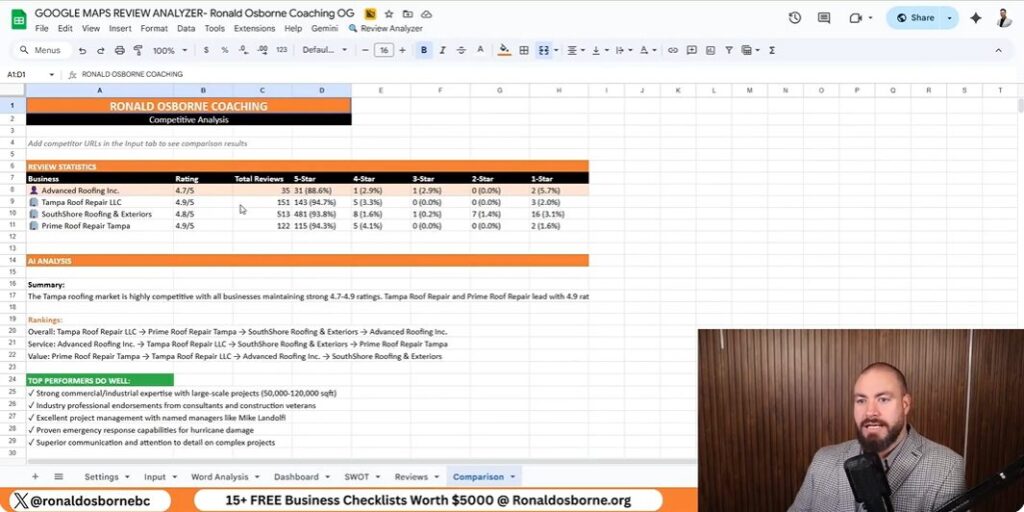
After the data loads, I move to the dashboard to compare things like average rating, total reviews, and star distribution.

The dashboard gives me:

The tool also runs a SWOT analysis automatically, splitting strengths, weaknesses, opportunities, and threats. If reviews mention slow paperwork or lousy communication, I mark those as weaknesses. If lots of people praise project results, that goes in strengths.

It’s pretty clear where competitors shine - and where I need to step up my own service.

Competitor Analysis For Local SEO
Competitor Analysis For Local SEO

Finding Gaps And Growth Areas

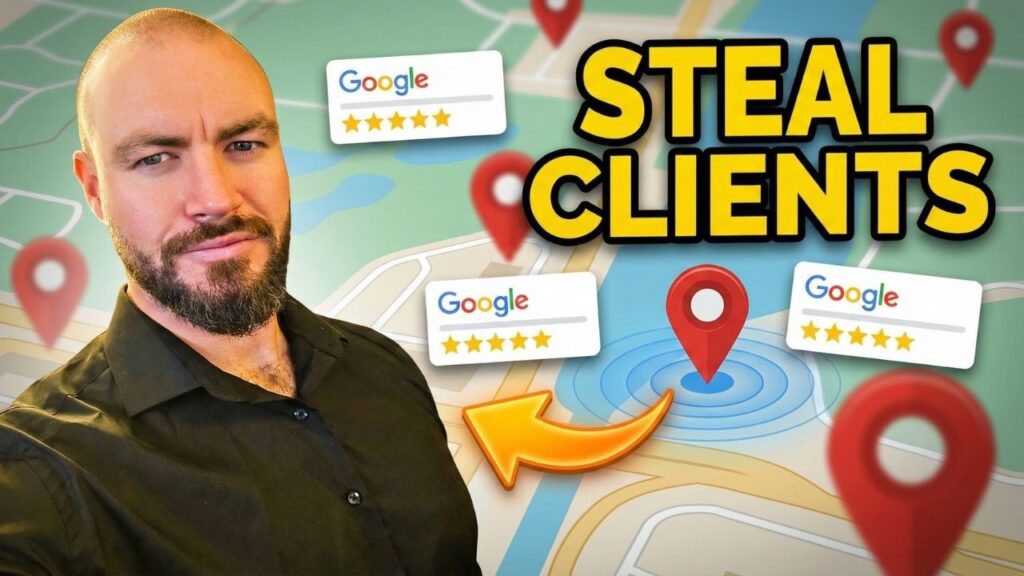
I use a Google review scraping tool to analyze local competitors. It pulls reviews from the top three businesses in my area and sets them side by side with mine.

After I paste each company’s URL, the system grabs review data and runs a full analysis automatically. The results show star ratings, total reviews, and sentiment spread for both good and bad comments.

This helps me spot where competitors stumble - like repeated complaints or slow service. I can also see keywords that pop up most, which tells me what customers really care about.

FactorMy BusinessCompetitor ACompetitor BCompetitor C
Average Rating4.24.84.64.1
Total Reviews320500410280
1-Star Reviews (%)7%3%4%9%

I look for patterns in the bad reviews. If customers keep mentioning paperwork delays or slow communication, that’s a red flag. Every negative comment is a lesson in what not to do - and where I can do better.

Measuring And Comparing Results

Once the tool finishes its scan, it builds a SWOT-style dashboard for me. It lists strengths, weak spots, opportunities, and possible risks based on the words and tone in real reviews.

CategoryInsight Example
StrengthsCustomers mention strong project management and skilled crews
WeaknessesComplaints about delayed paperwork and slow follow-up
OpportunitiesPromote positive feedback from consultants and property owners
ThreatsOverdependence on a single key staff member

If others get praise for “professional crews” or “quick project turnaround” and I never see those words in my reviews, I know I’ve got work to do. These insights help me sharpen my local SEO strategy because they show me which keywords and experiences matter most to local customers.

Automated Data Insights
Automated Data Insights

Text And Context Keyword Review

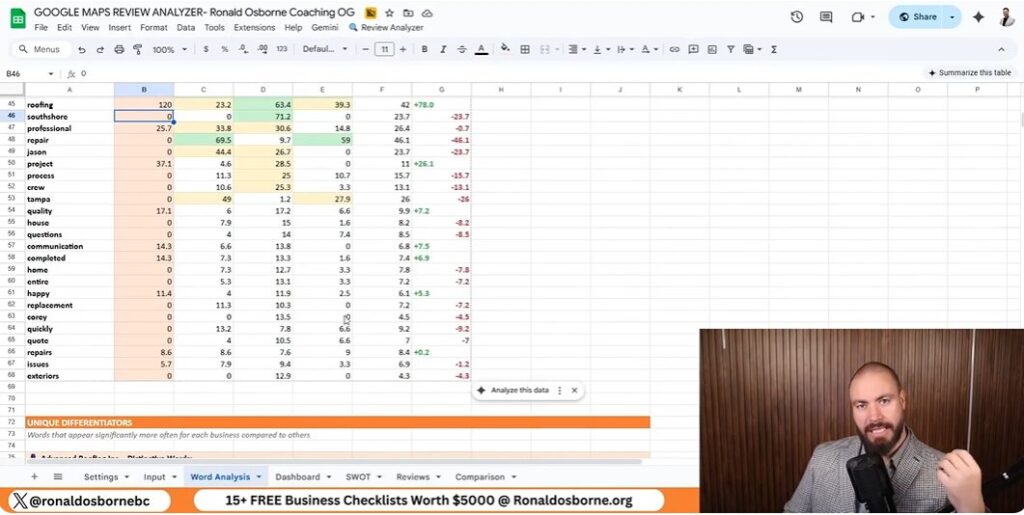
I use the review analyzer to scan Google reviews from my business and my top three competitors. The tool grabs every review, spots repeated words, and groups similar terms together.

It shows me how often words pop up and how they tie into customer sentiment. For example, words like professional, repair, or crew might show up more in a competitor’s feedback. I can see which terms build trust or show service quality - and where my reviews might be lacking.

Example MetricMy BusinessCompetitor ACompetitor B
Reviews Analyzed200310285
Common Positive Termsproject, reliable, teamcrew, fast, helpfulclean, responsive, detailed
Common Negative Termsdelay, paperworkcost, miscommunicationtiming, incomplete

These insights help me tweak my messaging and services so customers use stronger, more consistent keywords about my business.

Dashboards And Comparison Features

The dashboard puts all the collected data in one spot. I can quickly check ratings, total reviews, and average stars across competitors.

Graphs and tables show which business leads in each area. The automated SWOT report breaks out Strengths, Weaknesses, Opportunities, and Threats based on the language in reviews:

The breakdown gives me a roadmap for what to keep, what to fix, and where to push harder. The data and visuals turn customer feedback into steps I can actually take right now.

SWOT Analysis Integration

SWOT Analysis Integration

Positive Factors And Growth Possibilities

As I use my tool to scrape Google reviews, I can quickly spot where my company stands out compared to local competitors.

The automatic analysis highlights project management as a strong area, and customers mention it often in their feedback.

The tool also uncovers new opportunities.

For instance, reviews from consultants and property managers show strong satisfaction, so I can use their testimonials in future marketing.

It also points out patterns, like a growing interest in solar or green technologies - maybe that’s something worth exploring for expansion.

Strength/OpportunityAction Step
Excellent project managementFeature success stories on the website
Trusted by consultants and property managersUse testimonials in campaigns
Green technology interestAdd eco-friendly options to services

Challenges And Possible Risks

The analysis reminds me that some internal issues need attention.

Delayed paperwork and slow administrative processes frustrate customers, and poor communication during projects stands out as a weakness.

Another risk is relying too much on key team members.

Customers often mention one specific employee by name, which shows trust but also means I should train others to keep things stable.

Weakness/ThreatAction Step
Administrative delaysStreamline office tasks with digital tools
Poor communicationCreate clear client update routines
Dependence on key staffCross-train team members to share workload

Practical Applications For Businesses

Practical Applications For Businesses

Strengthening Customer Confidence

I use the review analyzer to figure out what customers value most.

The tool scans every review and highlights the words that show up a lot, giving me a real sense of what people talk about.

This helps me see if customers feel positive or negative about my business compared to others in the area.

Data PointInsight Example
Frequent Terms"Professional," "Project," "Team"
Customer ToneMostly positive with concerns about speed
Action StepImprove project time communication

When I see repeated concerns - like slow response times or unclear communication - I try to address them right away.

Staying on top of what customers mention helps build trust and keeps satisfaction up.

Managing Public Image Effectively

Comparing my company’s reviews to top competitors helps me spot weak spots that could hurt my brand’s credibility.

The automatic SWOT report pulls out strengths, weaknesses, opportunities, and threats based on what customers actually say.

Examples of insights include:

I use the data to improve staff training and refine processes, making sure the company’s image stays steady in search results and client feedback.

Getting Further Support

Viewing Client Feedback

You can see how I’ve helped others reach their business goals by checking the client feedback on my website, ronaldosborne.org.

I include both written and video testimonials that show real results from people and teams I’ve coached.

TypeDescription
Video ReviewsShort clips where clients talk about their growth and results
Written ReviewsComments and feedback available below the videos

These examples give you a clear idea of how my strategies have worked in different industries.

Reaching Out To Me

If you want help improving your business or want to dig into how the Google review scraper works, just reach out to me directly.

  1. Head over to ronaldosborne.org.
  2. Click to book a free discovery call.
  3. Pick a time that actually works for you.

On our call, we’ll chat about your business goals and how to scrape Google reviews effectively. We can also look at a few tools that might make your workday a little smoother.

How To Get Lawn Care Clients

How To Get Lawn Care Clients

I built my landscaping business with my brother from scratch, so I know firsthand how tough it can be to find and keep clients in this field. Over time, I realized that skill alone isn’t enough - you’ve got to build trust, reach out the right way, and use smart tools to connect with people.

Let me share what’s actually worked for me. These are practical, hands-on methods on how to get lawn care clients, not just theory.

The strategies I’ll lay out are all about credibility, lead generation, and clear communication. Whether you’re brand new or trying to grow your business, these steps can help you build a steady stream of clients. You might even turn your effort into real results.

Key Takeaways

Building Credibility For Your Lawn Care Business

Displaying Your Results

I always show potential clients proof of what I can do. Clear before-and-after photos make a big difference and speak for themselves.

When I meet new leads, I bring my tablet with photos neatly organized so people can see my work right away.

Type of PhotoPurpose
BeforeShows starting condition
AfterDisplays results and skill
Wide ShotHighlights full property
Close-UpShows detailed quality

Even a handful of solid examples can leave a strong impression in just a few minutes.

Sharing Client Feedback And Success Examples

People trust you more when they hear others do too. I collect short, honest quotes from happy customers and include their names and what they do - like realtors or business owners.

Example list:

I’ll also mention simple case examples, like boosting curb appeal for rentals or keeping big commercial lawns neat. These real-life stories show what I can do without sounding like I’m bragging.

Building a Strong Online Profile

I keep my website clean and professional. It has photos, reviews, and contact info so clients can reach me easily.

I update it often so people know I’m still active. Social media helps too - I share project photos and customer comments. When someone searches for lawn care in my area, they see a consistent, reliable image. I always double-check that my contact form, phone number, and address are up to date.

Lead Generation Strategies For Lawn Care Companies

Lead Generation Strategies For Lawn Care Companies

Using Free Lead Tools

I built a free lead generation sheet that helps me find tons of potential clients without spending a dime. The tool scans online listings and grabs contact details for each result.

Once I run it, I get business names, emails, phone numbers, and addresses. Then I can call, email, or even visit them.

Tip: If you’re using a free tool like this, keep a short sales script handy. Have your before-and-after photos ready to go - trust builds fast when you show real results.

StepActionTime Needed
1Open the lead generator1 minute
2Enter industry and location30 seconds
3Click “Find Leads”1 minute
4Review and contact leadsVaries

Focusing On Certain Fields And Areas

I always narrow my search to industries and locations that make sense for lawn care. Real estate agents - especially those managing multiple properties - are great contacts since they need reliable landscapers.

I also look at roofers, medical offices, and dental clinics. These places usually want regular outdoor maintenance.

When I pick a city, I keep my list focused. If I work in Miami, I don’t bother with leads in Tampa or Jacksonville. Staying local means I can respond faster and close deals more often.

Example:

Making The Most Of Google Maps

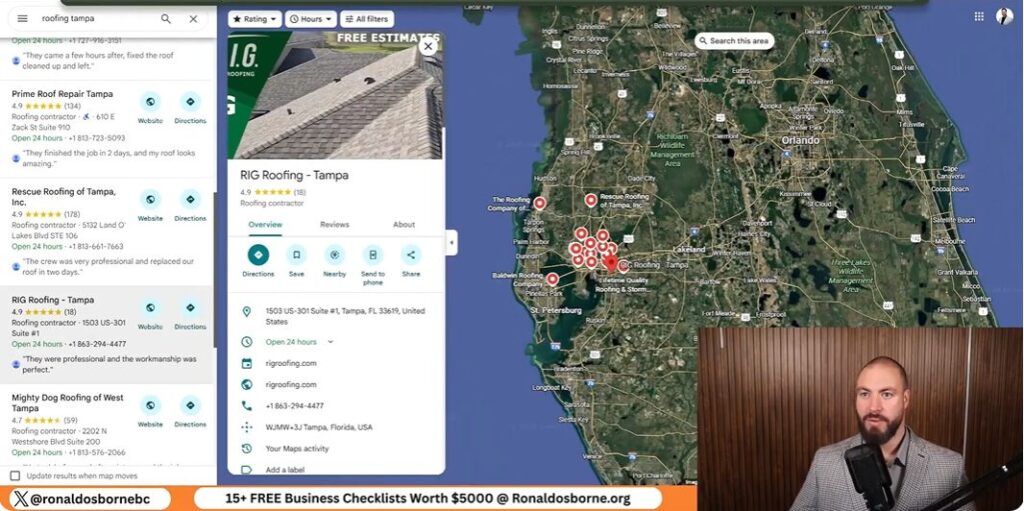
Google Maps is one of my go-to tools. I use it to find businesses in the industries I want to target. The lead generator checks Google Maps and organic results, pulling only verified listings.

Once I have the data, I check each website right from the sheet. If I’m not ready to call, I’ll email them through their contact form. When I visit in person, I dress sharp and bring my portfolio on a tablet. That personal touch often turns a quick meeting into a paying job.

Effective Outreach And Sales Techniques To Attract Lawn Care Clients

Effective Outreach And Sales Techniques To Attract Lawn Care Clients

Reaching Out To Potential Customers

I start by finding local businesses that need regular maintenance - think real estate agencies or clinics. They usually manage several properties. I use a lead generator to grab contact details by location and industry, then reach out by phone, email, or in person.

MethodBenefit
EmailEasy to send portfolio and photos
Phone CallBuilds trust with your voice
Visit in PersonShows confidence and professionalism

Building A Clear And Attractive Offer

When I reach out, I lead with results. I talk about lawns I’ve improved and show before-and-after photos. That builds credibility fast.

I keep my pitch short, focus on the value I offer, and explain how my work saves clients time and boosts curb appeal.

Example points to include:

Showing A Professional Appearance

How you present yourself matters. I wear clean, neat clothes and bring a tablet or folder with my best work. People size you up fast, so I make sure I look organized and serious.

Whether I’m at their office or knocking on their door, I keep my tone friendly but confident.

Appearance ElementWhy It Matters
Neat outfitSignals reliability
Portfolio tabletShows quality clearly
Polite greetingMakes a good first impression

Utilizing The Ronald Osborne Lead Generator

Utilizing The Ronald Osborne Lead Generator

Getting Started With The Tool

I built my lead generator to help business owners find clients quickly without paying for ads. To use it, go to RonaldOsborne.org and open the Client Lead Generator. The template is ready to go - totally free as you explore how to get lawn care clients.

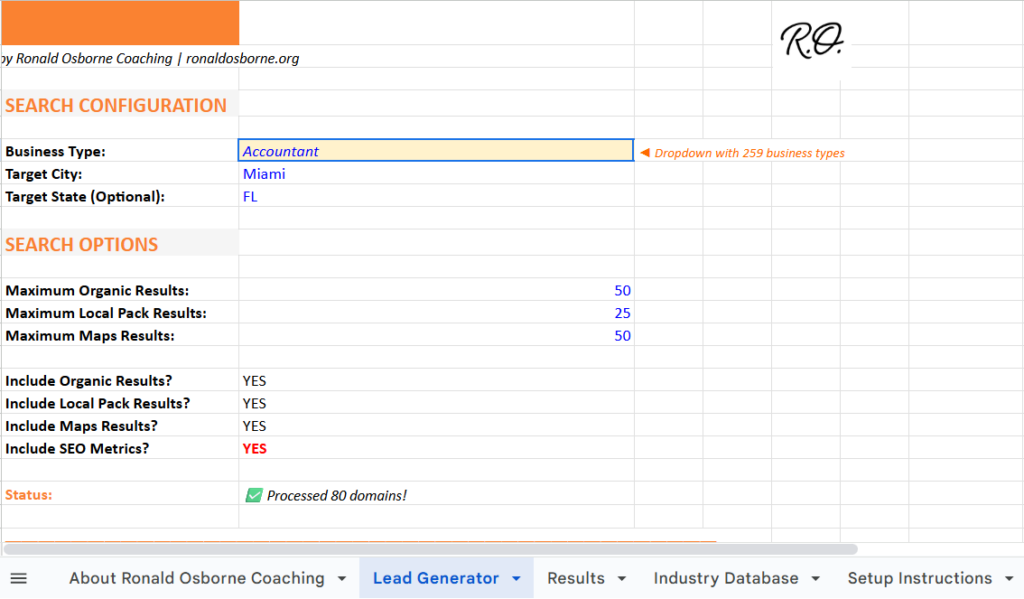
Just enter your industry and location. For example, I might pick Real Estate Agents in Miami. If you’re searching a big city, keep it under 400 leads so it stays accurate. Once you set your filters, hit Find Leads. In about a minute, your list shows up in the results tab.

StepActionTip
1Visit the site and launch the toolNo login or payment needed
2Enter industry and cityKeep searches local
3Click “Find Leads”Wait about 1–2 minutes
4View results tabReview and save your leads

Organizing And Refining Contacts

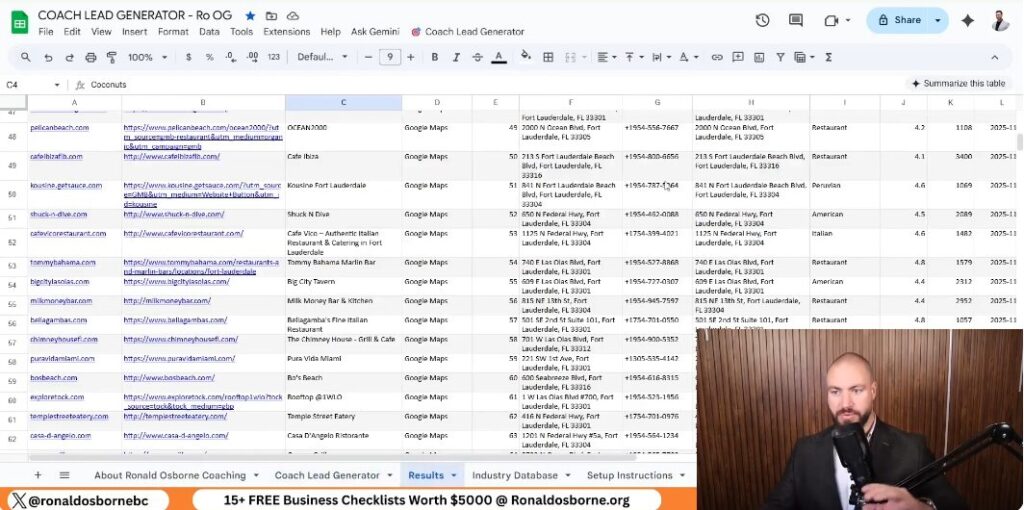
When the search finishes, you’ll see company names, websites, phone numbers, and addresses. Use this info to start your outreach. I add potential clients to a simple spreadsheet to track calls, emails, and visits.

If you prefer email, visit each company’s contact page for direct addresses. For in-person work, plan a few short visits each day. Keep your credibility materials handy - photos, reviews, and a clear pitch.

Boosting Contact Results

If you want the best results, you’ve got to stay consistent. I suggest spending at least two days reaching out to new leads. If you show up prepared - with a clean look and professional attitude - you’ll stand out.

Use a short, clear intro when calling or visiting. Mention your service, show proof of past work, and explain how you can help. If you try this and don’t see progress in two days, I’ll give you a free one-hour call to review what happened and help you adjust.

Client Communication Strategies

Client Communication Strategies

Email And Phone Outreach

I reach out to potential clients directly using the leads I find. Every listing gives me phone numbers, email addresses, and websites.

I usually check their sites for a contact page first. Then I'll send a short, professional message about my lawn care services.

When I call, I keep things direct and polite. I mention the types of properties I work on and point out a few examples of my results.

Honestly, a clear and confident tone goes a long way. People seem more willing to listen when I sound sure of myself.

MethodPurposeTip
EmailStart communication with photo samples or short introductionsAvoid long paragraphs
PhoneBuild personal trust quicklyUse a calm and professional voice

In-Person Networking

I make sure to dress neatly and carry my portfolio or tablet. I stop by local businesses from my lead list and introduce myself.

Walking in shows a bit of confidence and effort, I think. Real estate agents and property managers often need regular maintenance, so I always bring before-and-after photos to show them.

Greeting people by name - if I know it - helps. Face-to-face communication just builds credibility so much faster than online stuff.

Checklist before visiting:

Effective Follow-Up Methods

After first contact, I follow up within two or three days. If we spoke by phone, I send a quick thank-you email.

If I met them in person, I send another message with more photos or a short reminder of our conversation. Keeping track of who I contacted helps me avoid confusion.

I use a basic spreadsheet to jot down responses and plan my next move. Here’s the follow-up pattern I stick to:

  1. Initial contact
  2. Email or call within 3 days
  3. Message again in 1 week if no reply
  4. Stop after 3 attempts without interest

Support And Continued Learning

Scheduling A Free Call For Guidance

I offer a free 15-minute consultation where we can talk about your progress and what you should try next as you explore how to get lawn care clients. During the call, I give practical tips for lead generation, building trust, and managing your marketing budget.

What to prepare before the call:

You can book this session right through my website.

Joining Our Private Facebook Network

I’ve set up a free Facebook group where business owners can ask questions and get support. I check the group often and personally answer posts, so your questions won't get buried.

Inside, members usually:

If you want quick answers or advice, post in the group instead of leaving a comment somewhere else - I always reply there.

Connecting With The Wider Online Network

The online community lets you learn from others who are testing out the same methods. People often post the exact steps and results they get using the free lead generator.

Here are a few ways to stay active:

  1. Jump into the comments on posts about new strategies.
  2. Share your own progress with the tools, even if it’s messy.
  3. Ask questions about marketing in your area - someone probably has an answer.

Staying active means you’re more likely to pick up fresh techniques. It also makes it easier to keep your growth efforts on track.

Free Brand Monitoring Tool

Free Brand Monitoring Tool

When I first started tracking how my competitors showed up online, I wanted something simple. I built a free brand monitoring tool that connects with Google Sheets and pulls mentions from places like Yelp, Instagram, and industry directories.

With just a few steps, I can see where any company is listed. That information helps me strengthen my own online presence. This free brand monitoring tool doesn’t need technical skills or coding. I just enter a business name and website, tweak a couple settings, and it collects results automatically.

It sorts listings, filters out duplicates, and ranks sources by relevance. That makes it easier to see how competitors build visibility.

Key Takeaways

Overview Of The Free Brand Monitoring Tool

Main Functions

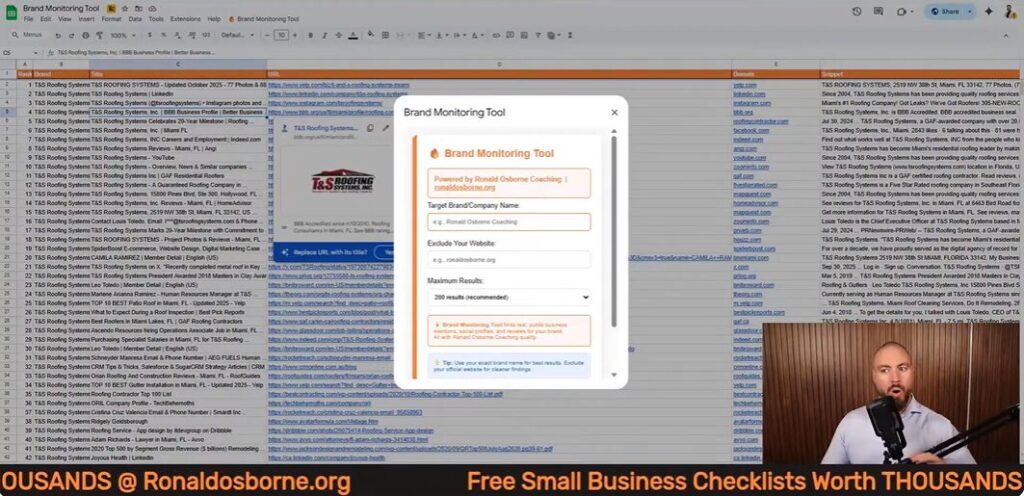
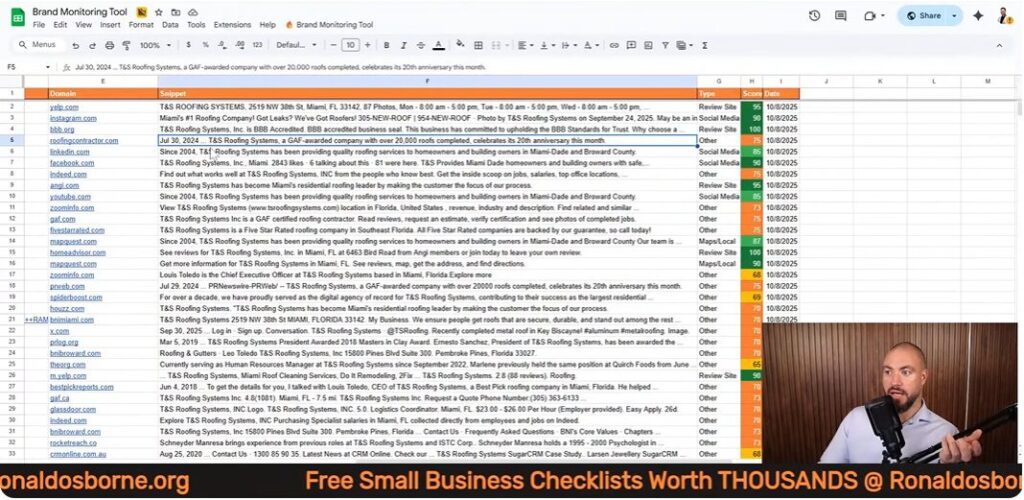
I built a free spreadsheet tool to track where a business or competitor appears online. It works inside Google Sheets and uses an API call to collect results from different websites and social media platforms.

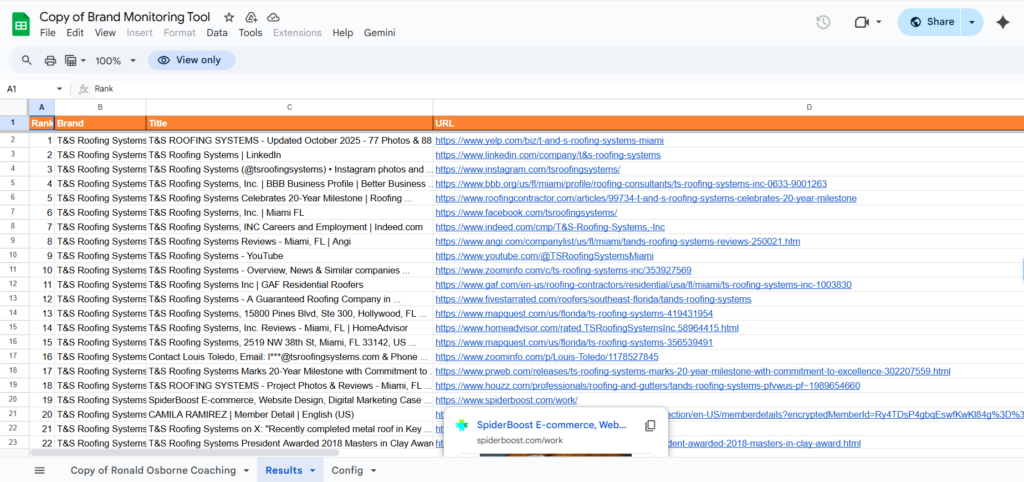
I can enter a brand name and its domain, and in just a few minutes, the sheet lists up to 500 mentions from sources like Yelp, Instagram, and industry directories.

ColumnDescription
RankOrder of results found
BrandThe company name entered
TitlePage title pulled from the web
URLDirect link to the mention
TypeSource type (social, review, or directory)
ScoreColor-coded rating to identify valuable listings

The setup just needs a valid API key and a few basics in the config file. I make sure to strip any extra text from the domain and use the right business name for accuracy.

Advantages Of Monitoring Your Brand

Using this tool helps me compare my brand’s visibility with others in my industry. I can quickly spot which sites list my competitors and find new places to build my own presence.

Getting Access To The Brand Monitoring Tool

Getting Access To The Brand Monitoring Tool

How To Get The Tool

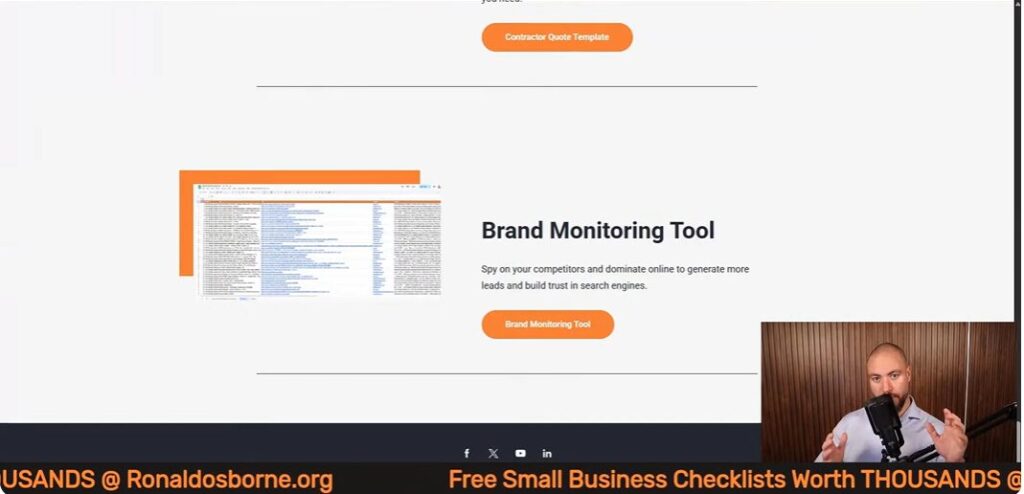
I made this brand monitoring tool available as a Google Sheet. You can grab it by heading to ronaldosborne.org and opening the Brand Monitoring Tool page.

A direct link sits under the video. Once you open the sheet, you’re good to go - no download or payment needed.

To check your competitor, just enter their business name and domain (like businessname.com). Don’t include https:// or slashes. The sheet will search sites like Yelp, Instagram, and industry directories, showing up to 500 results.

StepActionExample
1Go to the shared sheet linkronaldosborne.org
2Enter competitor’s website (no https://)examplecompany.com
3Type the exact business nameExample Company
4Click “Start Brand Monitor”Runs search automatically

API Connection Setup

The tool connects to data sources using an API key. I’m not a coder, so I made this part easy. There’s a short setup video linked under the sheet, and it only takes about two minutes to get your API key.

Google gives you $200 in free API credits every month. That’s plenty for normal use, even if you run hundreds of brand searches. After you get the key, just open the config file, paste it into the right cell, and save. The system’s ready to go with no extra hassle.

No Technical Experience Required

You don’t need coding or IT skills. I built this for people like me who want quick results without touching code.

Just fill in the name and domain, hit one button, and watch the data show up. The layout keeps everything clear, showing results by rank, URL, and category.

If you spot duplicates, you can filter them out in seconds. I wanted tracking competitors to feel straightforward and quick.

Setting Up The Tool

Setting Up The Tool

Adjusting The Spreadsheet

I open the Google Sheet through my website. Once it loads, I check that the configuration tab is visible. This tab connects to an API that pulls data from online sources.

No coding required - Google’s free monthly credits cover the cost. The sheet can pull up to 500 brand mentions in one go, so it works for wide searches.

Steps I follow:

  1. Go to the configuration file.
  2. Paste the API key in the right cell.
  3. Save changes and return to the main sheet.
ColumnPurpose
BrandName of the business
DomainMain website URL
TypeSource category (social, directory, etc.)
ScoreRelevance indicator

Entering Business And Website Details

Next, I type in the target company’s official name and website domain. I strip away extras like “https://” or “www.” so only the base domain remains, like domain.com or domain.com.au.

I avoid nicknames or brand variations. For example, using Ronald Osborne instead of Ronald Osborne Coaching gives more accurate results. I double-check the correct version on the company’s About or Contact page.

Once I enter that info, I hit the Start Monitor button. A message pops up to show the search has started. The system runs several queries, collecting social media links, review pages, and industry directories.

Best Practices For Clean Data Entry

Keeping entries neat and the data organized helps this free brand monitoring tool run smoothly and gives better results.

How The Brand Monitoring Tool Works

How The Brand Monitoring Tool Works

Starting A Brand Lookup

I open the spreadsheet and enter two details - the company’s name and its main domain. I strip away any extras like “https://” or slashes, so it’s just the domain, like example.com.

Then I hit Start Monitor and the sheet starts searching across the web. The system connects through a free API and returns up to 500 entries.

I can pick how many to load - 100, 200, or more - depending on how deep I want to dig.

Categories Of Online Appearances Tracked

The search checks several sources all at once. It looks through:

Each result comes with a label for the source type, which helps me filter and organize everything.

Source TypeExample SiteCommon Use
Social MediaInstagram, XBranding and content
Review PlatformYelpCustomer feedback
Industry ListingRoofingContractor.com, GAFTrade credibility

Reading And Using The Results

Once the search wraps up, the sheet displays several columns:

I can filter or sort the data to find duplicates or zero in on the listings that matter. Green-scored entries highlight strong opportunities for building or improving a brand’s online presence.

Interpreting And Filtering The Results

Interpreting And Filtering The Results

Reading The Data Columns

When the search wraps up, I notice a few columns that really stand out. Rank tells me where each result lands in the list.

Brand shows the business name I searched for. Title gives me the headline from the web page.

URL links straight to the listing. I find this makes skimming a lot easier.

The Type column labels each entry as things like social media, review site, or industry listing. This helps me group sources quickly.

Sometimes I filter the data to focus on just one category. Other times, I compare different platforms side by side.

ColumnDescription
RankLists the result order
BrandCompany or name searched
TitlePage headline or name pulled from the site
URLDirect link to the page
TypeSource type (social, review, industry)
ScoreRelevance or priority level

Prioritizing Listings With Scores

The Score column helps me figure out which opportunities are worth my time. I keep an eye out for results marked in green since those are usually the most valuable.

Trusted directories or big social pages tend to boost brand visibility. When I’m comparing competitors, I go straight to the top-scoring entries.

I jot down any platforms they’re using that I’ve missed. Then I add those to my own plan, no shame in borrowing good ideas.

Example priority list:

  1. High-score social profiles
  2. Well-known review sites
  3. Industry-specific directories

Spotting Repeat Entries

Sometimes the sheet pulls in duplicate listings. Yelp or LinkedIn pages might show up more than once because their URLs can be quirky.

I check the domain part of the link to see if two entries are actually the same. If so, I remove extras to keep things tidy.

This helps avoid confusion later when I’m counting total mentions. Every valid URL should be unique, so I can match each listing to a different source.

Pros And Cons Of The Brand Monitoring Tool

Pros And Cons Of The Brand Monitoring Tool

Benefits

I built this tool to quickly spot where a brand or competitor pops up online. It hooks into an API and connects through Google Sheets, so I can track listings across places like Yelp, Instagram, and industry directories.

Key Strengths include:

FeatureBenefit
API connectionPulls accurate, real-time listings
Scoring systemHelps identify important mentions
Free monthly creditsRemoves cost concerns
Built-in filtersSpeeds up analysis

Drawbacks

The tool saves me a ton of time, but it’s not perfect. Sometimes it includes duplicate links, especially from review sites like Yelp.

I have to clean up extra entries now and then. It also caps results at about 500 listings per run, so if you work with huge brands, that can feel limiting.

Occasionally, the data takes a few minutes to load while the tool does its thing. Nothing’s ever instant, right?

Limitations to keep in mind:

Best Practices For Competitive Analysis

Using Data To Strengthen Brand Position

I use a simple spreadsheet tool to track where competitors show up online. It lists their profiles on social media, review sites, and industry directories.

When I enter their name and domain, I see all their public mentions in one place. I focus on clean, accurate inputs - the business name should match exactly what’s on their website’s “About” page.

I strip out prefixes like “https://” and endings such as “/home.” That way, the system only searches the right domain.

To spot the best results, I use color-coded scores.

This format makes it easy to spot credible platforms where my brand should show up, too.

Listing TypeExample SourceValue for a Brand
Social MediaInstagram, LinkedInBuilds public presence
Review SitesYelpImproves local trust and visibility
Industry SitesTrade or supply directoriesStrengthens professional credibility

Tailoring Methods For Each Market

Every industry has its own digital spaces. When I look at competitors, I check if they’re listed on trade-specific platforms.

Roofing businesses, for instance, should show up on supplier directories run by material manufacturers. That’s just one of those small details I like to catch early.

This strategy helps me figure out which authoritative sites really matter in a field. If I see a competitor on an official partner page, I usually try to land a similar spot myself.

Even this free brand monitoring can reveal these opportunities if you poke around enough. I’ll often compare hundreds of results - sometimes up to 500 mentions - to spot patterns.

Duplicates do pop up, but filtering them lets me zero in on genuine insights and cuts out the noise.

How To Generate B2B Leads

How To Generate B2B Leads

When I first started building my business, I realized pretty quickly how crucial it is to find the right leads. Over time, I came up with a simple system that helps spot potential clients using clear data and straightforward tools.

Now, I keep everything efficient and affordable with a structured sheet that sorts leads by industry and location.

In this session, I’ll walk you through how I find and analyze business opportunities online. I’ll also show you how to generate B2B leads and reach out to potential clients once I’ve got their details lined up. This saves time, cuts costs, and lets business owners focus their energy where it actually matters.

Key Takeaways

Essential Tools For B2B Lead Generation

B2B Lead Sheet Breakdown

I use a simple lead sheet that pulls business data straight from Google. I can search by industry and location to zero in on exactly who I want to target.

The sheet grabs info like business name, website, phone, address, rating, and where they show up on Google.

Here’s a quick look at what the sheet includes:

FieldDescription
Business NameThe name of the company
Website URLDirect link to the company’s site
Phone NumberContact number for outreach
AddressBusiness location
CategoryType of business or service
Google RankTheir position in search results
ReviewsNumber of customer ratings

To get started, I fill in the industry, target city, and state. I always use capital letters for location names so the system reads them right.

Then I pick how many results I want - up to 1,000. After that, I hit the Find Prospects button, and in just a few minutes, the sheet spits out a list of potential clients ready for contact.

Getting Free Business Materials

Anyone can grab this lead sheet and some free tools from my website. I include a business checklist, goal templates, and access to over 250 listing sites that help boost online visibility.

These resources make it easy to set goals and attract more leads without spending extra cash.

To download them, just head to my site and scroll to the section with the free templates. Once you’ve got them, you can use the tools right away.

Setting Up The Lead Generation Sheet

Setting Up The Lead Generation Sheet

Setting Up Industries And Regions

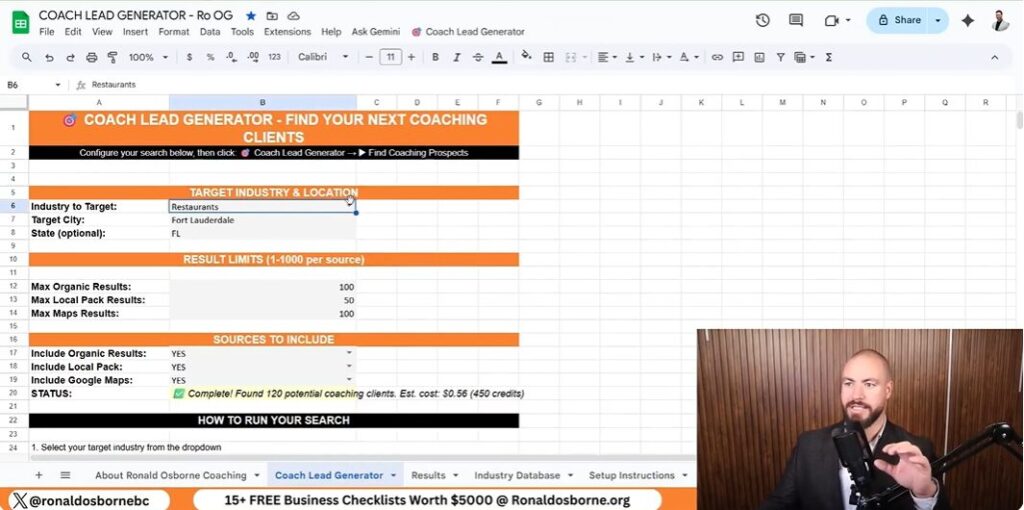
I start by opening the Lead Generator tab. This is where I pick what kind of businesses I want to find and where to look.

For example, maybe I want to search forrestaurants in Fort Lauderdale, Florida. I type the industry and location in capital letters, like this:

FieldExample Entry
IndustryRESTAURANTS
CityFORT LAUDERDALE
StateFL

Capital letters help the sheet avoid errors and pull accurate data. It’s a small thing, but it makes a difference.

Fine-Tuning Sheet Entries

Next, I tweak the available fields to match the search scale I want. I can set the maximum results, map pack limit, and local result count.

Here’s a sample setup I use a lot:

SettingValue
Max Results1000
Map Pack Limit150
Local Results100

These limits help me control how much data I pull. Once everything looks right, I click Find Coaching Prospects and let it run.

The sheet updates in real time at the bottom with progress and any errors, which is handy if something goes sideways.

Adjusting Search Filters

I change the search terms and phrases in the query fields to target specific markets. Sometimes I swap in real estate agents, or maybe roofing contractors or flooring companies.

The sheet combines the industry and region filters automatically and calls the API to fetch the data.

When it’s done, the results include:

This data lets me quickly spot which companies fit my target profile so I can reach out or tweak my search further.

Using Google For B2B Lead Extraction

Using Google For B2B Lead Extraction

Using Google Maps And Search Results

I use Google Maps and standard search results to find and target business leads. By plugging in the right keywords and narrowing by location, I can pull detailed info about companies in a specific industry or area.

This helps me find key prospects, like real estate agents or restaurant owners, without burning through my budget.

I rely on industry terms and city or state names in my searches. For example, typing “restaurants Fort Lauderdale Florida” brings up local listings with accurate business details.

Google Maps gives me contact numbers, addresses, and even customer ratings, which is great for sizing up a business before reaching out.

Pulling Essential Business Information

Once I run my lead generation sheet, it organizes all the Google data into an easy format. The sheet lists key details like:

ColumnDescription
Business NameThe company’s name as it appears online
Website URLDirect link to the business site
Position on GoogleSearch ranking or placement
Phone NumberContact number for outreach
AddressPhysical business location
CategoryType of business or industry
Ratings/ReviewsPublic score and feedback

I always capitalize each city and state name before running the search to keep results accurate. I can adjust the number of results - maybe 150, maybe 1,000 - and the tool wraps up the search in a few minutes.

Then I review the data to see which businesses might need help improving their reach, and I contact them directly using the info I’ve pulled.

Analyzing And Engaging Prospects

Analyzing And Engaging Prospects

Reviewing Lead Details

I use a lead generator sheet that pulls business data by location and industry. It grabs company names, websites, addresses, categories, ratings, and contact numbers. This is an important process in exploring how to generate B2B leads.

This helps me spot who ranks high or low in Google results and what areas might need a boost.

Data CollectedExample
Business NameSmith Roofing Ltd
Websitewww.smithroofing.com
Address22 Main St, Miami, FL
Reviews45
CategoryRoofing Services

When I review these results, I look for things like total reviews or missing info. If I see low review counts or bad rankings, I make a note to bring that up when I reach out.

Contact And Follow-Up Methods

Once I have the data, I reach out directly - usually by phone or email. I use the info I’ve gathered to make my approach specific to each business.

I refer to the data while talking. For example, if a local business has way fewer reviews than a competitor, I’ll point out the difference and talk about ways to catch up. It keeps the conversation practical and actually helpful.

Broadening Lead Generation Options

Broadening Lead Generation Options

Reaching More Platforms For Business Listings

I make sure to list businesses on hundreds of online directories so I can open extra channels for leads. When a company shows up on more sites, more people find it - no ads or cold outreach needed.

Here’s a quick rundown of what I focus on:

StepActionPurpose
1Add business details to 250+ listing sitesBoost search visibility
2Keep contact info consistentBuild trust and make updates easier
3Check listings monthlyEnsure accuracy and performance

This multiplies exposure and brings in steady traffic from people already looking for services like yours.

Making Use Of Extra Templates

Along with the lead sheet, I share several free templates that save time and help track results. These tools make organizing tasks simpler and give structure to follow-up efforts.

I often use:

Using these templates keeps my process organized. I can handle more leads efficiently across different campaigns, and honestly, it just makes life a whole lot easier.

Maximizing Value With Ronald Osborne Coaching

I help business owners find new clients using low-cost, practical tools. My guide on how to generate B2B leads sheet pulls data straight from Google Maps and search results to spot potential clients in any location or industry.

It’s easy to use and doesn’t take long to set up. You just enter theindustryandgeographic areayou want to target.

Data TypeInformation Collected
Business NameStraight from Google results
Website URLDirect domain link
Contact InfoPhone number and address
CategoryBusiness type or field
Ratings And ReviewsBasic performance insight

The sheet automatically lists potential leads after you run it. You can reach out to these businesses, compare ratings, and start meaningful conversations about growth.

The data lets you personalize your outreach and focus on those most likely to respond. I also throw in free tools like smart goal templates and listing checklists.

These help you get your business on hundreds of directories and boost visibility while saving cash. Everything’s streamlined, so you can skip the guesswork and actually focus on what grows your revenue.

How To Get Clients

How To Get Clients

Picture this: I'm standing in front of a packed room, asked on the spot how I landed my first major marketing client. Sweat? Oh, buckets. The secret sauce, as it turns out: real credibility, guts, and knowing how to wield the right lead generation tools without blowing your budget. Forget the generic advice the internet peddles - this is my uncensored, how-I-actually-did-it rundown. From the days of door knocking (yes, with grass-stained knees) to the first time my inbox flooded with leads, I'll unravel the strategies on how to get clients and resources that fueled millions in my businesses and clients'. You ready to skip the fluff and get clients? Let's dive in, human-style.

TL;DR: If you're after clients and not empty promises, focus on building real credibility, use proven free (and cheap) lead generation tools, master the outreach game, and always - always - refine your sales pitch. Don't overthink it; just get started and let experience do the heavy lifting.

Why Credibility Is Your Golden Ticket And How To Earn It

If there’s one thing I’ve learned after years of generating millions in revenue for my own businesses and clients, it’s this: credibility trumps any paid ad when it comes to landing real clients. You can have the fanciest website or the biggest ad budget, but if you can’t prove you’ve delivered results, you’ll struggle to close deals. Let me break down how you can build and leverage credibility - no fluff, just what actually works.

Show, Don’t Just Tell

I’ve closed deals simply by pointing to projects I’ve actually completed. When a potential client asks, “Have you done this before?” I don’t just talk a big game - show them real examples. Whether it’s a telecom company I built from scratch or a construction project I managed, concrete proof beats empty promises every time.

Start Small, Build Fast

If you’re new and don’t have a long track record, don’t worry. Every job - no matter how small - can be spun into a credibility asset. Did you help your buddy’s dental office get more patients? Did you assist a local roofer with their website? That counts. Document it, get a testimonial, and add it to your pitch. The key is to start somewhere and stack those wins.

Testimonials: Your Secret Weapon

Forget slick branding for a second. Testimonials from real people matter more. Even if your first testimonial is from a friend, your dentist, or a small local business, it’s gold. I’ve got feedback from everyone from contractors to the co-chair of the Florida State Bar on my website. These voices speak louder than any logo or tagline ever could.

Niche Down And Own It

Being the go-to person for a specific type of business is worth its weight in gold. If you’ve helped three remodelers in Fort Lauderdale, you’re now the remodeler expert in that area. Niche expertise makes you memorable and referable. Don’t try to be everything to everyone - own your lane.

Keep Your Proof Fresh

Once, I lost a deal because my case studies were too old. Don’t let your proof go stale - keep updating your portfolio and testimonials.

Clients want to see that you’re active and current. Make it a habit to refresh your case studies and ask for new testimonials after every successful project.

Free Client Lead Generator To Find Clients

Free Client Lead Generator To Find Clients

Let’s get real: cold lists and generic databases don’t cut it anymore. If you want to find clients who actually need your services, you need targeted, up-to-date leads - without burning through $3,000 a month on marketing. That’s why I built my free Client Lead Generator sheet. This tool is the exact opposite of those stale, recycled lists you see floating around. It lets you mine thousands of potential leads, tailored by both industry and geography, so you’re always talking to the right people.

When I started out, I didn’t have a big budget. In fact, I used to count quarters from phone booths just to pay for my first campaigns. So, I know firsthand how much a free tool can matter - especially when you’re hustling to get your first few clients. That’s why I made this sheet accessible to everyone, no matter your industry or how much you have to spend.

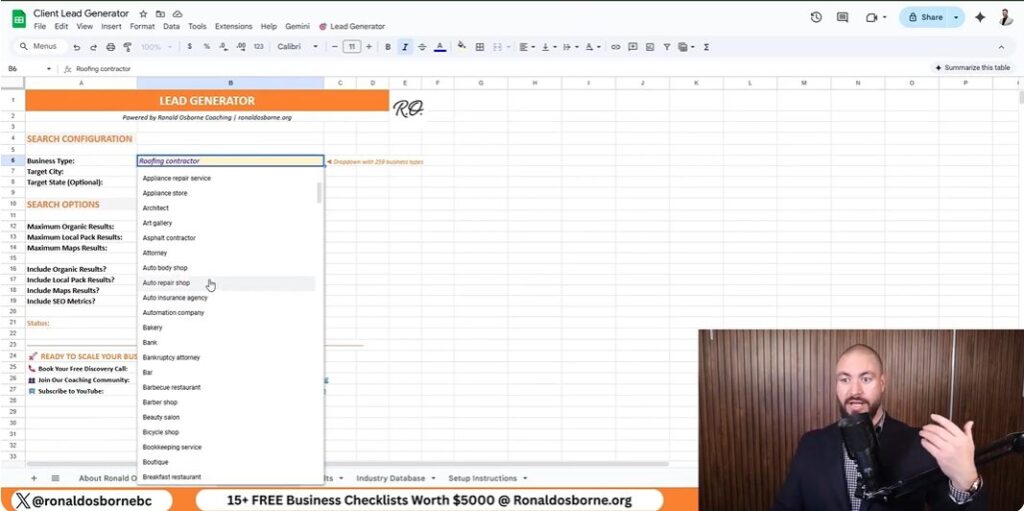
Here’s how it works: Select your industry from the dropdown (there are 260+ options), set your location, and choose how many leads you want. Hit “find leads,” and the sheet pulls up emails, phone numbers, websites, and addresses. You can even check ratings and reviews to weed out the duds before you reach out.

Don’t worry about the small fee you might see in the demo - I show you how to set it up for free using a Data For SEO API key, which comes with $1 in free credit when you use my referral link. Just enter your email and API key, and you’re ready to go.

This tool is manual, but that’s the point. You’ll know your market’s pulse better than any agency that just hands you a list. And when you reach out, always lead with your credibility - show them you’ve helped others just like them. That’s how you turn leads into real clients.

Secrets Of One-To-One Outreach: Emails, Calls, And Door-Knocking

Secrets Of One-To-One Outreach Emails, Calls, And Door-Knocking

If you want real results, you can’t be afraid to get scrappy. Forget the idea that fancy email automation or the latest AI tool will do all the heavy lifting for you. Sometimes, a simple phone call or even knocking on someone’s door beats every digital shortcut out there. In a world where everyone’s hiding behind screens, the human touch is your secret weapon.

Here’s my no-nonsense approach: I use my Client Lead Generator sheet as a literal call list. I pull up leads - let’s say remodelers in Fort Lauderdale - and before I reach out, I always check their ratings and reviews. Trust me, risky clients will drain your energy and time faster than you think. If their reviews are a mess, I move on. Life’s too short to chase headaches.

When I do reach out, I keep it awkward but honest. My opener is simple:

"Hey, I know your time’s gold. I’ve helped [insert relevant client], and I think I can help you."

This opener works because it’s real. People appreciate when you cut through the fluff and respect their time. I always lead with credibility - mentioning specific clients or results I’ve delivered. If you’re just starting out, reference any real-world wins you have, even if they’re small. Authenticity builds trust.

Here’s how I organize my outreach:

Wild card story: I once landed a $50,000 contract just by handing out business cards while jogging around my neighborhood. You never know where your next client will come from if you’re willing to put yourself out there.

Bottom line: Don’t hide behind digital walls. Use the tools - like my lead sheet - but remember, your hustle and human approach are what actually close deals. Track your outreach, learn from every interaction, and never underestimate the power of a genuine, direct connection.

Integrating AI, SEO, And Paid Ads

Integrating AI, SEO, And Paid Ads

If you’re serious about exploring how to get clients and lead generation, you need to know how to blend AI, SEO, and paid ads in a way that fits your business and budget. Here’s my no-nonsense approach, based on real-world results - not marketing hype.

SEO: The Highest ROI Channel

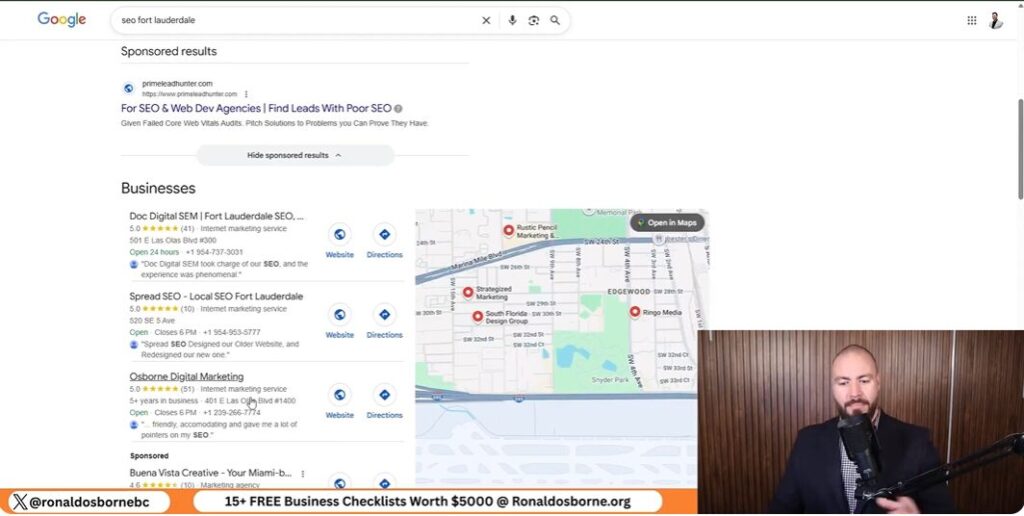
Let’s start with what’s worked best for me and my clients: SEO. I’m not exaggerating when I say SEO has been my ROI king. For every $1 I’ve put into SEO, I’ve seen $5 to $8 back. These aren’t inflated numbers - they’re based on actual campaigns for my businesses and clients. The key is to focus on local intent. For example, ranking for “remodeler Fort Lauderdale” or “SEO Fort Lauderdale” brings in leads who are ready to buy, not just browsing. Don’t chase broad or vanity keywords. Go after the terms your real clients are searching for in your city or service area.

Paid Ads: Fast, But Watch Your Margins

Paid ads - Google, Meta (Facebook/Instagram), and TikTok - can get you instant visibility, but be careful. For service businesses, Google Ads can work, but the return is usually tighter: $1 in, maybe $1.25 out. That’s why I recommend paid ads mainly for e-commerce or if you need leads right now. For service providers, start with Google and Facebook before even considering TikTok. Don’t spread yourself thin across every platform - double down where your audience actually hangs out.

AI-Powered Tools: Supercharge Your Outreach

AI tools, like my free Client Lead Generator sheet, are game changers. They help you:

But here’s the truth: AI can’t close deals for you. You still need to pick up the phone, send that email, or walk into their office. Use AI to save time and filter out duds, but always add your personal touch.

Channel Selection: Match Your Industry

Every industry is different. If you’re a roofer, dentist, or contractor, Google and Facebook are your best bets. E-commerce? Lean into Meta and TikTok. Always pay attention to sales intent - it’s better to rank for a niche local term that brings in buyers than to chase big, generic keywords. That’s how you get real clients, not just traffic.

Sales Skills: The Ultimate Tool Even The Best AI Can’t Replace

Sales Skills The Ultimate Tool Even The Best AI Can’t Replace

Let’s get real: you can scrape every lead on earth, but if your pitch stinks, you’re dead in the water. I’ve seen it firsthand in my own businesses and with clients across industries. You can have the best lead generation tool - like my free Client Lead Generator sheet - but if you can’t sell, you won’t close deals. That’s why sales skills are the ultimate tool, even in an age where AI can do almost everything else.

Here’s my no-nonsense approach to sharpening your sales edge:

Remember, even the best AI can’t replace the human touch in sales. Use technology to find leads and improve your process, but never skip the fundamentals. Script, practice, seek feedback, and always keep learning. If you want to win clients - especially when everyone else has the same data - your sales skills are your real edge.

Building Credibility From Zero

Building Credibility From Zero

If you’re starting out with no portfolio, no testimonials, and no big-name clients, don’t panic. Every expert you see today started exactly where you are. The key is to build credibility fast, even if you’re brand new. Here’s my no-nonsense approach that’s worked for me and countless clients across industries.

Piggyback For Quick Wins

When you have zero track record, the fastest way to get proof is to piggyback on someone else’s. Subcontract for established companies, support bigger brands, or offer your first few jobs at a steep discount - or even for free. The goal isn’t to work for free forever, but to get those first wins under your belt. For example, if you’re a roofer, reach out to local contractors and offer to handle overflow work. If you’re a marketer, help a friend’s business or a local nonprofit for a case study.

Document Everything - No Matter How Small

Every project, even the tiniest one, is a story you can use. Take before-and-after photos, save emails from happy clients, and ask for testimonials. These early wins become the foundation of your credibility. I started with photos of a neighbor’s roof I fixed and a commercial site I helped renovate. Those projects turned into case studies that I still reference in pitches today.

Pitch With Specifics

When you’re talking to a potential client, specifics are your best friend. Instead of saying, “I’ve done roofing,” say, “See that building on Main Street? That was me.” Instantly, you’re not just another contractor - you’re the person who did that job. This approach works in any field, from digital marketing to landscaping. Show, don’t just tell.

Wild Card: Use Yourself As The Case Study

If you truly have no client work yet, use your own business or website as your test case. For example, if you’re offering SEO, rank your own site for local keywords like “SEO Fort Lauderdale.” Track your progress, document your process, and showcase your results. Prospects want to see proof you can deliver - your own results count just as much as client work when you’re starting out.

Building credibility is about hustle, proof, and storytelling. Every small win can become the story that lands your next client.

Coaching, Community, And Getting Unstuck: Where To Turn When You Need That Extra Edge

If you’ve ever hit a wall in your business - where the leads slow down, the phone stops ringing, or you just can’t seem to move the needle - know this: you’re not alone, and you don’t have to stay stuck. One of the smartest moves you can make is to get a fresh set of eyes on your situation. That’s why I offer a completely free 15-minute discovery call and discuss with you personally how to get clients. Sometimes, all it takes is a quick conversation for me to spot something you’ve missed or to give you a new angle you hadn’t considered. I’ve seen business owners go from zero to booked out just by tweaking their approach after a single call.

But let’s be real - trying to do everything yourself can be a recipe for burnout and missed opportunities. Isolation kills momentum. That’s why I built my Facebook group specifically for marketers, contractors, and business owners who want to get real answers and connect with others who are hustling just as hard. Inside the group, you can ask any marketing or business question and get a direct answer from me - not just generic advice, but tailored feedback based on real-world experience. Plus, you’ll be able to network with other gritty entrepreneurs who are facing the same challenges and sharing what’s working right now.

Some of my best strategic shifts didn’t come from expensive courses or endless trial and error - they came from a single comment in a mastermind or a group thread. When you’re plugged into a community, you get access to collective wisdom and support that can spark your next big breakthrough. Whether you’re stuck on lead generation, struggling to close deals, or just need a push to get moving again, having a network or a mentor can make all the difference.

And here’s a bonus: the only place you can ask me anything and actually get a personal answer is inside my Facebook group. I don’t offer this level of direct help on YouTube or anywhere else. So if you’re serious about getting unstuck and want to tap into proven strategies, don’t go it alone. Use the free tools, book a call, and join the community. I’m here to help you get that extra edge and finally bring in the clients you deserve. Let’s get after it, legends.

Free SMART Goals Template

Free SMART Goals Template

Ever had a brilliant New Year's goal crumble by February? Yeah, me too. Years ago, I vowed to grow my business while prepping a complicated lasagna - let's just say, both the lasagna and my goal-setting got burnt. Since then, I've coached everyone from skeptical chiropractors to ambitious entrepreneurs using my free SMART goals template that actually stick. If you want wild stories, concrete action steps, and the goal-tracking spreadsheet I swear by, you're in the right place.

TL;DR: If you've ever set a goal and let it gather dust, this guide reimagines SMART goals in a way that's raw, practical, and fun - backed by real stories, a killer tracking template, and strategies designed for actual humans (not robots). Download the tracker, steal my best goal-setting moves, and watch those resolutions finally get done.

My Strangest Goal-Setting Failure (And Why It Matters More Than You Think)

Let me take you back to what I call the infamous “lasagna-and-goal-setting disaster.” It was January, and like most people, I was riding high on New Year’s motivation. I had a fresh planner, a stack of sticky notes, and a head full of big dreams for my business. I also had a bubbling lasagna in the oven. In my mind, I could easily juggle both: cook dinner and map out my entire year’s worth of goals. Spoiler alert: I ended up with a burnt dinner and a pile of half-baked goals that never saw the light of day.

Why am I telling you this? Because multitasking nearly tanked my business aspiration that year. I thought I could set meaningful goals while distracted, but all I did was scribble vague ideas like “grow my business” and “get more clients.” Sound familiar? If you’ve ever written down a New Year’s resolution and forgotten about it by February, you’re not alone. In fact, research shows that over 80% of people abandon their resolutions within six weeks. I was one of them, and maybe you have been too.

The Real Reason We Abandon Our Goals

Here’s what I learned from my lasagna fiasco: the problem wasn’t just that I was distracted. The real issue was that my goals weren’t SMART - they weren’t Specific, Measurable, Achievable, Relevant, or Time bound. I wrote down what I wanted, but I didn’t give myself a clear path to get there. And that’s exactly why most people - doctors, coaches, entrepreneurs, and yes, even business coaches like me - stumble over the same vague goals year after year.

Without clarity, your brain doesn’t know what to focus on. It’s like asking your GPS to take you “somewhere nice” - you’ll end up lost or, worse, going in circles. That’s exactly what happened to me. My goals were so broad that I didn’t know where to start, so I never did. By February, my planner was collecting dust, and my business was stuck in the same place it had been the year before.

No Shame In Setbacks - They’re Clues To Lasting Change

Here’s the wild truth: there’s no shame in failing at your goals. In fact, your setbacks are full of hidden clues about what actually works for you. When I looked back at my lasagna-and-goal-setting disaster, I realized I needed to treat my business goals with the same focus and care I’d give to a patient or a client. I couldn’t just “fit them in” between other tasks. I needed to carve out dedicated time, use a proven system, and get specific about what I wanted to achieve.

“If you treat your goals like an afterthought, they’ll stay that way - forgotten and unfinished.”

That’s why I created my SMART goals tracker. It forces you to get clear, get focused, and get real about your objectives. And it’s why I walk my clients - chiropractors, coaches, and entrepreneurs - through each step, so they don’t make the same mistakes I did.

Why We All Stumble Over Vague Goals

Whether you’re a doctor launching a new clinic, a coach growing your client base, or an entrepreneur scaling your business, the pattern is the same. We all want big results, but we rarely take the time to define what “big” actually means. We write down dreams, not plans. And when life gets busy (or the lasagna burns), those dreams get pushed aside.

But here’s the thing: your failures aren’t the end. They’re the beginning of a smarter, more focused approach. If you’ve ever felt embarrassed about abandoning your goals, remember - every setback is a signpost pointing you toward a better system. And that’s exactly what the SMART framework is designed to give you.

Breaking Down The SMART Goals Framework (With All the Flaws, Fails, And Surprises)

Breaking Down The SMART Goals Framework

If you’ve ever set a goal that fizzled out by February, you’re not alone. Most guides on SMART goals make it sound like a magic bullet, but here’s the wild truth: the framework is powerful, but only if you use it right - and most people don’t. Let’s break down what really works, what doesn’t, and the surprises I’ve discovered coaching chiropractors and business owners just like you.

What Most ‘SMART Goals’ Guides Won’t Admit

Here’s what you won’t hear in the average blog post: SMART goals can be just as useless as vague resolutions if you don’t get brutally honest and specific. I’ve seen so many people fill out a SMART worksheet, check all the boxes, and still get nowhere. Why? Because they skip the hard part: making each step uncomfortably clear and actionable.

The Plain-English Breakdown

Why ‘I Want More Clients’ Is Useless

Let’s get real: “I want more clients” is a wish, not a goal. It gives you nothing to aim for, nothing to measure, and no urgency. Instead, try this: “I want to sign 15 new clients by March 31 using Google Ads, Facebook Ads, and referrals.” Now you have a target, a timeline, and a strategy. That’s a goal you can actually work toward - and track in my SMART goals tracker.

Anecdote: When ‘Achievable’ Burned Me

Here’s a story I’ll never forget. Years ago, a client came to me wanting to triple their revenue in three weeks. They were fired up, but the numbers just didn’t add up. We mapped out the math, looked at their current capacity, and it became clear: this wasn’t just ambitious - it was impossible. We had to dial it back and set a goal that stretched them, but didn’t break them. That experience taught me the hard way that “achievable” isn’t about playing it safe - it’s about being honest with your resources, time, and energy. If you skip this step, you’re setting yourself up for frustration and burnout.

So, when you’re using my SMART goals tracker, don’t just fill in the blanks. Push yourself to get specific, use real numbers, check if your goal is truly achievable, make sure it matters to you, and set a deadline that gets you moving. That’s how you turn a spreadsheet into a six-figure practice - just like Dr. Sarah did.

How To Use The SMART Goal Template With Example Data

How To Use The SMART Goal Template With Example Data

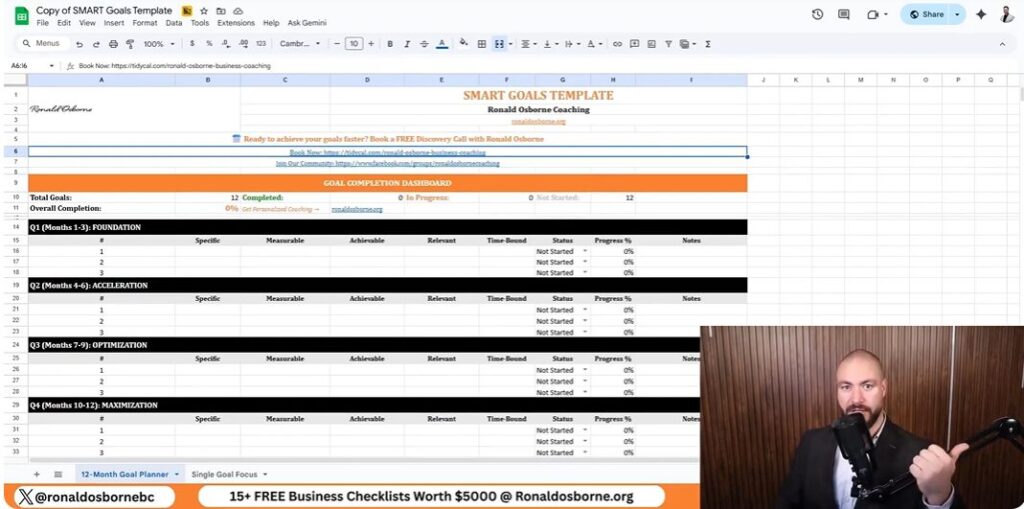
If you’ve ever set a New Year’s resolution only to forget about it weeks later, you’re not alone. That’s why I created my SMART goal tracker - a tool I use with every coaching client to break down big dreams into actionable steps. Let me walk you through exactly how to use this free SMART goals template, using a real-world chiropractic example, so you can see how it turns vague intentions into real, measurable progress.

Step-By-Step: From Big Vision To Bite-Sized Tasks

My tracker is designed to move you from a broad vision to specific, trackable actions. Here’s how it works:

  1. Start with your big vision. For Dr. Sarah, a chiropractor, this meant launching her own clinic and hitting $10,000/month in recurring revenue within 12 months.
  2. Break it down by quarter. Each quarter, you’ll set a focused milestone that brings you closer to your annual goal. For example, Q1 for Dr. Sarah was all about securing her clinic space and getting it ready for patients.
  3. List out the bite-sized tasks. Under each milestone, add the specific steps you need to take - like signing a lease, ordering equipment, or hiring staff.
  4. Track your progress. My tracker includes a progress column where you can mark tasks as “Not Started,” “In Progress,” or “Complete,” and even add a percentage to see how far you’ve come.

The Two-Tab System: 12-Month Overview Vs. Single-Goal Focus

To keep you organized and laser-focused, my template has two tabs:

How To Use Progress Metrics (And Avoid Spreadsheet Graveyard)

Most people abandon their goal spreadsheets because they don’t see progress. My tracker solves this with simple, visual progress metrics:

This approach keeps you engaged and accountable. Every update is a mini-win that motivates you to keep going.

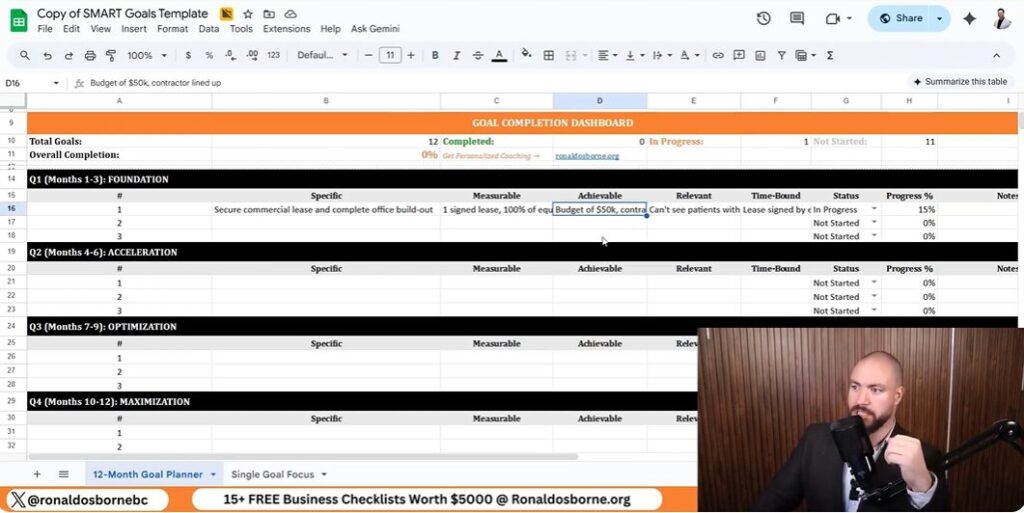
Example Walkthrough: Dr. Sarah’s Commercial Lease And Equipment Milestone

Let’s look at how Dr. Sarah used the tracker for her Q1 milestone:

Quarterly Milestones Table: Dr. Sarah’s Clinic Launch

QuarterMilestoneBudgetDeadlineProgress
Q1Secure lease and complete buildout$50,000March 31In Progress (70%)
Q2Acquire first 20 clients$5,000 (marketing)June 30Not Started
Q3Hire front desk and support staff$10,000September 30Not Started
Q4Reach $10,000/month revenueOngoingDecember 31Not Started

By breaking down the year into clear, achievable chunks and tracking every step, Dr. Sarah transformed her vision into a thriving, six-figure practice. You can do the same by following this SMART goal system - one milestone, one update, one win at a time.

The Goal-Setting Sidequests That Make All The Difference

The Goal-Setting Sidequests That Make All The Difference

If you’ve ever felt like you’re stuck in a rut with your goals, let me share a wild truth: sometimes, the real magic happens when you chase a goal that seems totally unrelated to your business. I know this sounds counterintuitive, but hear me out. A few years ago, I decided - on a whim - to learn how to juggle during my lunch breaks. No, it wasn’t because I wanted to join the circus. I just wanted to see if I could do it. What happened next shocked me: that silly little sidequest gave me a burst of energy, focus, and confidence that spilled over into my coaching sessions, my client calls, and even my own business planning. Suddenly, I was hitting my targets faster and with more enthusiasm than ever before.

Here’s the thing: setting goals without tracking them is like throwing spaghetti at a wall and expecting a Michelin star meal. Sure, it’s fun to toss things around, but it’s messy, random, and you’re not likely to end up with anything you’d want to serve to guests. The same goes for your chiropractic practice. If you’re just setting goals in your head or scribbling them on a napkin, you’re missing out on the real power of the process. Tracking your progress - whether it’s through my free SMART goals template or another system - turns chaos into clarity. It’s the difference between hoping for results and actually seeing them stack up, week after week.

Let me get real with you for a moment. Over the years, I’ve had my fair share of coaching bloopers. There was the time I thought tracking daily water intake was a waste of time - until I realized my energy levels (and, yes, my productivity) skyrocketed when I stayed hydrated. Or the time I dismissed the idea of a “gratitude journal” as fluffy nonsense, only to discover that jotting down three things I was grateful for each morning made me more resilient when business got tough. These little “sidequests” didn’t seem important at first, but they ended up being the glue that held my bigger goals together. They gave me momentum when I needed it most.

So, what’s the takeaway for you as a chiropractor or business owner? Don’t be afraid to set a SMART goal that feels a bit outrageous or even unrelated to your main business objectives. Maybe it’s running a 5K, learning a new language, or finally tackling that stack of unread books on your nightstand. The key is to make it specific, measurable, achievable, relevant, and time bound - just like we discussed earlier. Track your progress in the same way you would for your business goals. You might be surprised at how much momentum you build in all areas of your life.

Here’s my challenge to you: pick one SMART goal that’s just a little outside your comfort zone. Set it, track it, and - most importantly - share your results with me. Yes, I’m serious. Email me your outrageous goal and your progress. I actually read every message, and I’d love to celebrate your wins (and maybe even feature your story in a future post, with your permission).

Remember, the wild truth about goal-setting is that it’s not just about the big, obvious targets. It’s about the sidequests, the tracking, and the willingness to try something new - even if it feels a little silly at first. That’s where the real breakthroughs happen. So grab my SMART goals tracker, set your sights on something bold, and let’s make this year the one where you don’t just set goals - you crush them.

Lead Generation For Coaches

Lead Generation For Coaches

Let me tell you, when I left the military and started building my first business (no million-dollar inheritance, mind you), I had no clue what I was doing. That's why I'm not here to sugarcoat things - I'll share exactly what's actually moved the needle for me in coaching - and it isn't just about slick marketing or buying the fanciest software. You want $25K in recurring revenue? I'll show you how I did it with a lead generation for coaches tool so cheap you’d think I stole it off the Internet, but more importantly, with guts, outreach, and a process anyone can replicate. Even if you don't know your API from your elbow, you can do this. I'll even drop a “chips” metaphor because, well, it's honestly that inexpensive.

TL;DR: Quick recap: Generating $25K/month in recurring coaching revenue can be a lot simpler (and cheaper) than people say. Use a lead generation tool for targeted, industry-specific data, focus heavily on outreach (yup, pick up the phone!), and stick to a routine. There are no magic bullets - just systems, a bit of courage, and consistency. Anyone can do this, trust me.

How I Uncovered The Lead Generator That Changed My Business

When I first set out to grow my coaching business, I tried every lead generation trick in the book - networking, social media, cold emailing, you name it. But nothing prepared me for the unexpected reality I discovered: I could generate 150+ hyper-targeted leads for under $1. Yes, you read that right. For less than the price of a cup of coffee, I was able to fill my pipeline with real prospects who actually needed my coaching services.

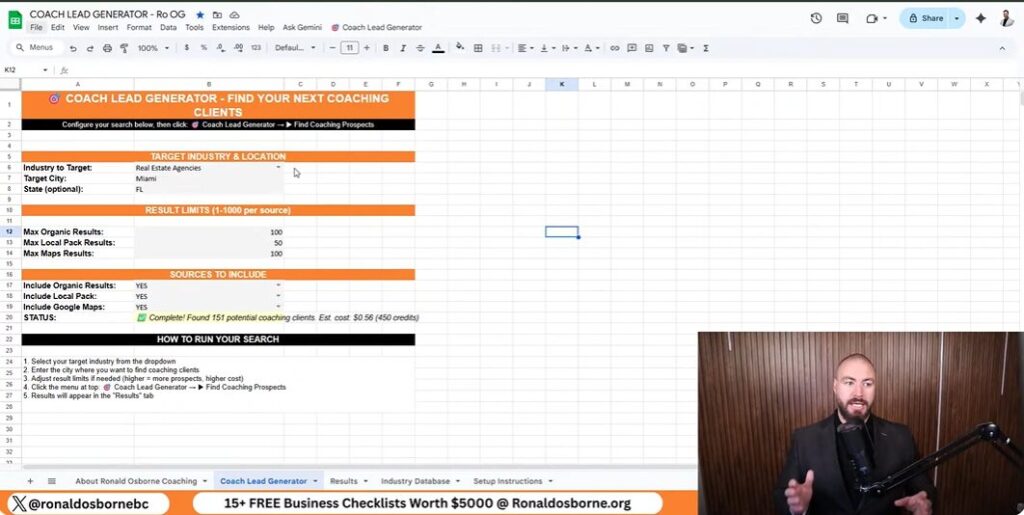
The game-changer was realizing that being industry and location-specific beats scattergun tactics every time. Instead of blasting generic messages to anyone and everyone, I started focusing on specific niches and regions. For example, if I wanted to coach real estate agencies in Miami, I simply selected “Real Estate Agencies” and “Miami” in the tool. Instantly, I had a list of 151 potential clients - all for just 56 cents. This level of precision meant I was reaching out to people who were much more likely to say yes.

The tool I use - what I now call my coach lead generator - pulls in data straight from Google. It’s simple: you enter your target industry and location, and the tool does the rest. Here’s what makes it so powerful:

What really blew my mind was the cost. Pulling hundreds of leads cost me literal cents. And because I could filter by industry and location, every lead was relevant. No more wasting time on dead-end prospects. I could even see which businesses had lower ratings, giving me a perfect opening to explain how my coaching could help them improve.

In short, this tool gave me the ability to generate thousands of targeted leads quickly and affordably. It’s the backbone of my $25K recurring revenue system, and it’s as simple as entering your criteria and clicking a button.

Why Cold Calling Beats Cold Email For Quick Wins

Why Cold Calling Beats Cold Email For Quick Wins

If you’re serious about hitting $25K in recurring coaching revenue fast, you need to get comfortable with cold calling. I know, it sounds old school - but trust me, it works. Here’s why picking up the phone trumps blasting out another cold email, especially when you’re just starting out.

The Psychology Of Immediate Connection

Let’s face it: everyone’s inbox is overflowing. Your cold email is just another unread message buried under a pile of spam and newsletters. But when you call someone, you cut through all that digital noise. There’s a real human voice on the other end, and that instantly sets you apart. People are wired to respond to direct interaction. You get immediate feedback - whether it’s interest, questions, or even objections. That’s gold for a coach looking to start real conversations and build trust quickly.

My Rough-And-Ready Script: Keep It Personal, Keep It Real

I don’t use fancy scripts. My approach is direct, personal, and always references real data. Here’s a typical opener:

“Hey, is this Reena? I came across your agency on Google - you’ve got a 4.8-star rating with 41 reviews. That’s solid, but I noticed a few competitors are edging ahead. I help agencies like yours boost their ratings and close more deals - mind if I share a quick idea?”

Notice how I reference their actual rating and reviews? That instantly shows I’ve done my homework. It’s not a generic pitch - they know I’m calling them, not just anyone. This gets people talking, and that’s where the magic happens. I keep it conversational, ask questions, and always listen more than I talk. The goal isn’t to sell on the spot - it’s to open the door for a deeper chat.

Legal And Ethical Cold Calling: Use Common Sense

Cold calling isn’t about being pushy - it’s about being human, direct, and helpful. When you combine this approach with targeted data from the coach lead generator, you’ll see quick wins that cold email just can’t match.

Setting Up The Lead Generator

Setting Up The Lead Generator

Getting your lead generator up and running is honestly way easier than most people expect. You don’t need to be a tech wizard or even know what an API is - just follow the prompts and you’ll be pulling in targeted leads in minutes. Here’s exactly how I do it, step by step:

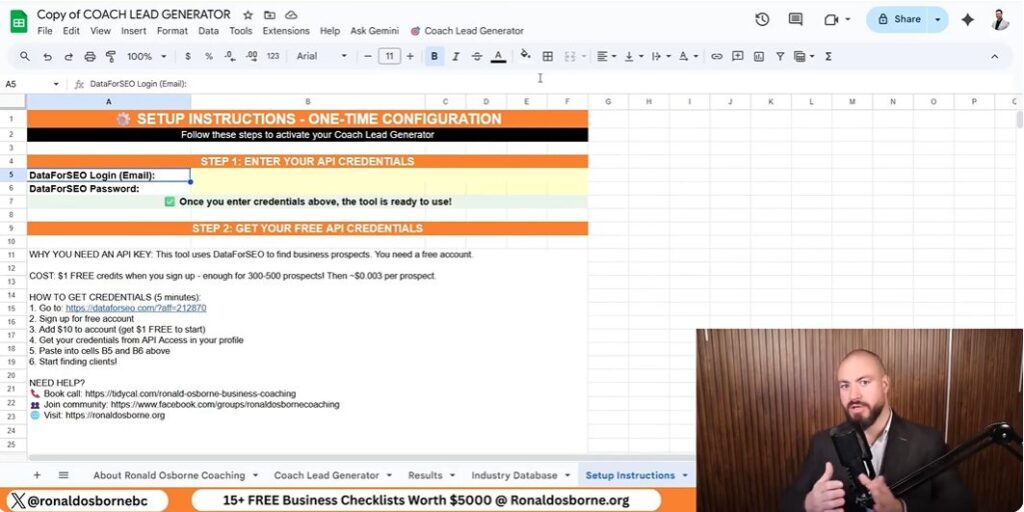
Step 1: Sign Up For DataForSEO

First, you’ll need a DataForSEO account. Head to their signup page (I provide the link in my resources), and create your free account. You can start with as little as $10, but here’s a pro tip: they give you a $1 trial credit just for signing up. That’s enough to test drive the system and pull 300-500 leads at zero risk.

Step 2: Get Your API Key

After you sign up, DataForSEO will give you an API key. Don’t let the jargon scare you - think of it as your personal password for the lead generator. Just copy that key; you’ll need it for the next step.

Step 3: Plug The API Key Into The Lead Generator

Open the lead generator sheet (I share this with all my coaching clients). At the top, you’ll see a spot labeled “API Key.” Paste your DataForSEO key right there. That’s it - the tool is now connected and ready to pull in leads automatically, based on whatever industry and location you choose.

Step 4: Add Credit (Optional, But Recommended)

If you want to go beyond the free trial, just add $10 to your DataForSEO account. This tiny investment lets you generate thousands of targeted leads - often for less than a dollar per thousand. It’s truly “cheapest chips, mate,” and you’ll never worry about running out of prospects.

Step 5: Start Your Search

Now, just select your target industry and location from the dropdown menus. For example, “Real Estate Agencies” in “Miami.” Click “Find Coaching Prospects,” and watch as the tool fills your sheet with phone numbers, websites, ratings, and more. You can export this data for calls, emails, or deeper research.

That’s all it takes to set up your own auto-targeted lead machine - no coding, no headaches, just simple steps and instant results.

Let’s Talk Pros, Cons, And The Truth About This Lead Generator

Let’s get real for a second - if you’re looking to hit $25K in recurring coaching revenue, you need a lead generation system that’s not just effective, but also simple and affordable. I’ve personally used this lead generation for coaches tool, and I’m laying out the honest pros, cons, and what you actually get for your money.

Pros: Why I Love This Lead Generator

Cons: What You Need To Know

What You Pay Vs. What You Get

What You PayWhat You Get
$1Up to 1,000 targeted, accurate leads (industry + location specific)
Free ToolsLow-quality, outdated, or incomplete data; wasted time

Here’s the truth: If you want to build a real pipeline and stop spinning your wheels, investing a few cents per lead is a no-brainer. The data is fresh, the process is fast, and you’re not left guessing who to contact next. For coaches who want to grow fast, this is the shortcut I wish I had years ago.

How To Setup Coaches Lead Generator

How To Setup Coaches Lead Generator

Setting up the Coaches Lead Generator is honestly one of the simplest - and most powerful - moves you can make to fill your pipeline and build real momentum toward that $25K recurring revenue goal. I’ve used this exact system myself, and I can tell you firsthand: it works, and it works fast. The best part? You don’t need to be a tech wizard or spend hours fiddling with complicated software.

Here’s how you get started. First, you’ll need access to the lead generator sheet, which is powered by the DataForSEO API. Signing up is a breeze - just follow the link I provide, create your account, and load as little as $10 in credit (or take advantage of their $1 trial for 300-500 free leads). Once you’ve signed up, they’ll give you an API key. Paste that key into the sheet, and you’re ready to go.

From there, it’s as simple as entering your target industry and location. Want to coach real estate agencies in Miami? Just select “Real Estate Agencies” and “Miami” from the dropdown menus. Hit “find coaching prospects,” and within seconds, you’ll have a list of leads - complete with phone numbers, websites, and ratings. Export the data if you want to dig deeper or scrape for emails, but honestly, I recommend picking up the phone and calling. It’s the fastest way to start real conversations and stand out from the crowd.

I want to be clear: while this lead generation for coaches tool is incredibly efficient (and cheap - think less than a dollar for hundreds of leads), it’s not a magic bullet. No tool replaces your drive, adaptability, or personal touch. That’s your real edge in this business. Even I work with my own coach to stay sharp - because, let’s face it, sometimes we all slip. The right system will give you leverage, but your results will always come down to your willingness to take action and connect with people.

If you want direct advice or have questions about setting up your lead generator, don’t hesitate to reach out. I’m still hands-on and happy to connect with fellow coaches who are serious about growth. Join my free Facebook community, drop a comment, or send me a message. I’m here to help you build the coaching business you deserve - one real conversation at a time.

Free Cash Flow Template

Free Cash Flow Template

A few years ago, I was neck-deep in a client’s chaotic finances, trying to pinpoint why their cash always seemed to evaporate. Not only were they staring down payroll delays, but the stress was starting to show (one manager even broke out in hives - true story). That’s when I realized most business owners are flying blind with their cash flow. I’m Ronald Osborne, and today I’m not just handing you a free cash flow template; I’m giving you a battle-tested system - plus a few messy, hilarious, and eye-opening stories from the front lines you won’t want to miss.

TL;DR: Don’t let your small business run on hope - grab my free cash flow forecast template and see exactly where your money’s going, month by month. It’s easy, customizable, and a game-changer for anyone who wants control over their business finances.

Why Most Small Businesses Struggle With Cash Flow

If you’ve ever wondered why your business bank balance seems to shrink faster than you can say “invoice paid,” you’re not alone. Over the years, I’ve coached hundreds of small business owners, and cash flow confusion is by far the most common - and most dangerous - financial pitfall I see. Let’s break down why this happens, and what you can do to avoid it.

Cash Flow Confusion: Why Money Disappears Faster Than You Think

It’s easy to assume that as long as you’re making sales, your business is healthy. But cash flow isn’t just about how much money comes in - it’s about when it comes in, and how quickly it goes out. Many small business owners get caught off guard by the timing of expenses versus income. You might land a big contract, but if your client pays 60 days later and your bills are due now, you’re stuck in a cash crunch.

Here’s the reality: Profit does not equal cash in the bank. I’ve seen businesses with impressive sales numbers run into trouble simply because they didn’t have a clear picture of their actual cash position. That’s why tracking cash flow monthly - not just looking at your bank statement - is so critical.

Stories From My Coaching Clients: How Missing Cash Nearly Derailed Their Month

Let me share a quick story. One of my clients, a contractor, was confident he had enough money to cover payroll. But when payday arrived, he realized a key payment from a client hadn’t cleared yet. He was forced to dip into his personal savings to keep his team paid. This wasn’t a one-off - situations like this happen all the time, and they’re almost always preventable with the right tracking system.

Another client, a boutique retailer, lost track of small recurring expenses - subscriptions, software fees, and supplies. These “invisible” outflows added up, and by the end of the month, she was shocked at how little was left. It’s not about being careless; it’s about not having a simple, visual way to see where your money is going.

Common Mistakes - Like Tracking Weekly

One of the biggest mistakes I see is business owners trying to track cash flow weekly. I get it - you want to stay on top of things. But in reality, this approach leads to burnout and confusion. Weekly tracking creates a mountain of data that’s hard to interpret and doesn’t give you the big-picture trends you need to make smart decisions.

The Psychological Toll: Business Anxiety and Second-Guessing

Let’s be honest - cash flow stress can keep you up at night. I’ve seen talented entrepreneurs second-guess every decision because they’re worried about running out of money. This anxiety leads to hesitation, missed opportunities, and even burnout. When you don’t have a clear, simple system for tracking cash flow, you’re left guessing - and that’s no way to run a business.

That’s exactly why I created my free cash flow forecast template: to take the guesswork and anxiety out of managing your money. With the right tool, you can finally get a handle on your cash flow, make confident decisions, and focus on what you do best - growing your business.

The Anatomy Of My Free Cash Flow Forecast Template

The Anatomy Of My Free Cash Flow Forecast Template

Let’s dive into exactly how my free cash flow forecast template works, step by step. I designed this tool to be as straightforward and flexible as possible - so you can spend less time wrestling with spreadsheets and more time running your business. Here’s how you can get started and make it your own:

1. Downloading Your Free Template

First things first: accessing the template is a breeze. Just follow the link below my video, which takes you to my checklist landing page. Scroll down to the Small Business Cash Flow Template, click, and you’ll instantly get the Google Sheet - no payment, no fuss. You’ll also see other handy resources there, like my contractor quote and client proposal templates, all free for you to use.

2. Customizing Your Categories

When you open the template, you’ll notice a “data list” section. This is where the magic starts. By default, it’s set up for typical small business needs, but you can customize it in seconds. For example, if you want to track equity, just type “equity” into the data list. Instantly, “equity” appears as an option in your transaction dropdowns. I built this flexibility in because, as a coach, I’ve seen how every business is unique. Whether you’re tracking projects, retentions, or something industry-specific, you can adapt the sheet on the fly - no formulas to break, no headaches.

3. Inputting Inflows, Outflows, And Projects

Now, head over to the transactions tab. This is where you log your business’s real-life money movements:

You can keep it super simple - just track money in and out - or get as detailed as you like by breaking things down by project, retention, or custom categories. It’s all about what works for you.

4. Letting The Spreadsheet Do The Math

This is where you can breathe easy. The template automatically calculates your net and gross cash flow for each month, so you always know where you stand. The dashboard rolls up all your data, showing:

All calculations update instantly as you enter transactions. No more late nights worrying if you missed something - the math is handled, and your cash flow picture is always up to date.

With my template, you’re in control: customize, track, and let the spreadsheet do the heavy lifting - so you can focus on what matters most: growing your business.

The Power Of A Cash Flow Dashboard: Don’t Just Track, Diagnose And Improve

The Power Of A Cash Flow Dashboard

Let me share one of the most powerful features of my free cash flow forecast template - the dashboard. This isn’t just a place to track numbers; it’s your financial command center. Over the years of coaching small business owners, I’ve seen firsthand how a clear, visual dashboard can transform the way you manage your money. It’s not just about seeing what happened; it’s about understanding why it happened and what you can do next.

Year-End Insights At A Glance

The dashboard pulls all your monthly data together into a single, easy-to-read view. At the end of the year (or any time you need a snapshot), you can instantly see your total inflows, outflows, and net cash position. No more scrolling through endless spreadsheets or trying to piece together the story of your finances - everything you need is right there. This big-picture perspective is essential for making smart decisions, planning for growth, and preparing for tax time.

Cumulative Cash Trend: Spot Trouble Before It Bites

One of my favorite elements is the cumulative cash trend line. This simple chart tracks your cash position month by month, showing you exactly how your business’s cash is growing - or shrinking - over time. If you see that line dipping or flatlining, it’s a clear signal to investigate before things get out of hand. I always tell my clients: “You want that line going up, not down!” This visual cue is a lifesaver, helping you catch potential cash flow problems early, so you can adjust your spending, chase overdue invoices, or ramp up sales before you’re in the danger zone.

Top Three Biggest Expenses Revealed

Ever wonder where your money is really going? The dashboard automatically highlights your top three outflows each month. For most small businesses, these are usually staff payroll, materials, and equipment hire. By seeing these expenses front and center, you can quickly spot areas to optimize. Maybe it’s time to renegotiate supplier contracts or review staffing needs. Knowing your biggest costs empowers you to make changes that have the most impact on your bottom line.

Low Cash Alerts: What Flashing Red Really Means

Here’s a feature I added after seeing too many business owners blindsided by a sudden cash crunch: low cash alerts. If your cash balance drops below a threshold you set (like $5,000), the dashboard flashes a red warning for that month. This isn’t just a pretty color - it’s a real wake-up call. When you see red, it’s time to take immediate action. Maybe you need to delay a purchase, speed up collections, or talk to your bank. The dashboard gives you the heads-up you need to stay out of trouble and keep your business running smoothly.

With my free cash flow dashboard, you’re not just tracking your finances - you’re diagnosing issues and improving your business in real time. It’s the difference between reacting to problems and preventing them altogether. That’s the power of having the right tool at your fingertips.

When Should You Stop Using A Simple Template

When Should You Stop Using A Simple Template

Let’s get real for a moment - my free cash flow template is a game-changer for most small businesses, especially if you’re a contractor, startup, or running a company with annual revenue under $2 million. This tool was designed for you: the business owner who wants clarity, control, and confidence without the hassle or cost of complicated software. But as your business grows, your needs will change, and it’s important to recognize when it’s time to level up your financial systems.

Who’s This Best For?

When To Consider Integrations And Automation

As your business scales, you’ll notice the volume of transactions increases, and manual entry can start to slow you down. If you’re processing dozens (or hundreds) of invoices and payments each month, or if you’re juggling multiple bank accounts, it might be time to look at more advanced solutions like QuickBooksXero, or similar accounting apps. These platforms sync with your bank, automate data entry, and generate reports with a click - saving you hours every month.

The DIY Vs Automated Debate: Coach’s Perspective

I’ve coached hundreds of business owners, and here’s the honest truth: DIY tools like my free template are perfect for learning the ropes and keeping costs low. You get hands-on experience with your numbers, which is invaluable in the early stages. But as your business grows, your time becomes more valuable. Spending hours updating spreadsheets is time you could spend closing deals, leading your team, or developing new products. That’s when automation starts to make sense.

How To Know You’ve Outgrown The Free Sheet

“When hiring a bookkeeper feels worth every penny, that’s your sign you’ve outgrown the free sheet.”

Remember, there’s no shame in upgrading. The goal is to use the right tool for the right stage of your journey. Start simple, master your cash flow, and when the time comes, don’t hesitate to invest in automation that frees you up to focus on what you do best - growing your business.

Best Practices In Using A Free Cashflow Forecast Template And A Few Lessons Learned

Let’s be honest - nothing wakes you up faster than a cash flow mistake. I’ve seen it all in my years as a business coach, and I can tell you: a single error in your cash flow forecast can sting more than any MBA tuition bill. But here’s the good news: those mistakes are often the best teachers. When you use my free cash flow forecast template, you’re not just filling in numbers - you’re learning to spot red flags before they become emergencies. That’s the kind of real-world education you can’t get from a textbook.

One of the most important best practices I recommend is making your cash flow review a monthly habit. I had a client who used to dread looking at her finances - she’d put it off for months, then panic when bills piled up. Once she started using my template and set aside just 30 minutes at the end of each month, everything changed. She could see exactly where her money was going, spot trends, and make decisions with confidence. She told me, “Ronald, I finally sleep at night because I know what’s coming.” That’s the power of regular check-ins: they give you control and peace of mind.

Now, let me share a personal wild card moment. Early on, I was helping a contractor input his transactions. He accidentally left out a minus sign on a $15,000 outflow. The dashboard showed a huge cash surplus, and for a moment, we thought he’d hit the jackpot! But when we double-checked, reality hit - he was actually in the red. That little mistake caused a lot of unnecessary stress, but it taught us both a valuable lesson: always double-check your entries, especially those minus signs. The template makes it easy to spot these errors, but a quick review can save you a world of worry.

Another best practice is to use the template’s dashboard and visualizations to your advantage. Don’t just glance at the numbers - look at the trends. Is your cash position improving month over month? Are certain expenses creeping up? The trend line and top outflows summary are there to help you make smarter decisions, not just record history. And if you ever feel stuck or unsure, remember you’re not alone. I encourage you to join my free online community. There, you can share your own cash flow stories, ask questions, and even have a laugh about the time you mixed up inflows and outflows. Trust me, we’ve all been there!

In conclusion, using a free cash flow template isn’t just about tracking dollars - it’s about building confidence, learning from your mistakes, and connecting with others on the same journey. Mistakes will happen, but each one brings you closer to mastery. So download the template, make it your own, and don’t be afraid to reach out for help. I’m here, my community is here, and together, we’ll make sure your business stays healthy, resilient, and ready for anything.

Free Contractor Quote Template

Free Contractor Quote Template

A couple years ago, I watched a buddy lose out on a massive job just because his estimate was scribbled on a napkin – tragically old school! That’s what got me fired up to create a better, simpler way to quote like a true professional, even if you’re running on fumes and coffee. Today, I’m pulling back the curtain on the free contractor quote template I built – the same tool I share with all my coaching clients. I’ll break down not only how it works, but why it’s different from anything else you’ve used before (hint: it actually saves you time and doesn’t turn quoting into a second job). Ready to turn your next bid into a winner? Let’s jump in!

TL;DR: My free Google Sheets contractor quote template is designed to make quoting effortless, professional, and quick. With features like auto tax calculations, labor/material breakdowns, and a built-in client proposal, it's never been easier to impress clients and win more work. Ditch the napkin math - level up your business with the tools and workflow that hundreds of legends already use!

Why Most Quote Templates Fail (And How I Fixed It)

If you’ve ever tried to put together a professional quote for a client, you know the pain of clunky, outdated templates. For years, I relied on half-baked PDF forms, Word docs, and endless repetitive data entry. I’d spend hours copying and pasting the same business details, double-checking math, and hoping I didn’t miss a line item. It was frustrating, inefficient, and honestly, it made me look less professional than I wanted.

Let me share a quick story. A good friend of mine - let’s call him Mike - once lost a big job because of a “napkin quote.” He scribbled out a price on a scrap of paper, handed it to the client, and thought he was done. The client took one look and said, “Thanks, but I need something more official.” Mike lost out, and that moment stuck with me. I realized: if even experienced pros like Mike were struggling with quotes, there had to be a better way.

The Common Headaches With Traditional Quote Templates

How My Google Sheets Contractor Quote Template Solves Every Pain Point

After seeing too many contractors lose jobs or waste hours on quotes, I decided to build a solution from the ground up. My free Google Sheets Contractor Quote Template is designed to tackle every single headache I just mentioned - and then some.

“This template is a game-changer. I went from spending hours on quotes to just minutes, and my clients love the professional look.” - Actual user feedback

Bottom line: I built this template to eliminate the headaches I faced - and the ones that cost my friend Mike a big job. It’s free, it’s easy, and it’s designed to help you win more work, faster. No more clunky PDFs. No more napkin quotes. Just a streamlined, professional quoting process that puts you ahead of the competition.

How To Use The Free Contractor Quote Template

How To Use The Free Contractor Quote Template

Ready to stop wasting time with outdated quoting methods? Let me show you exactly how to use my free contractor quote template - the same tool that’s helped hundreds of contractors and small business owners look more professional, win more jobs, and save hours every week. This isn’t just a spreadsheet; it’s your new quoting powerhouse, packed with features that make quoting fast, accurate, and impressive for your clients.

Step 1: Access And Set Up Your Template

First things first: grab your copy of the template using the link below my video. This will take you to my exclusive library of free business tools. Open the Free Contractor Quote Template in Google Sheets - no downloads, no fees, just instant access.

Start on the README tab for a quick overview. Then, head to the settings tab. Here’s where you’ll enter your business name, contact info, and your local sales tax rate. If you require a deposit before starting work, you can set your standard deposit percentage here too. Enter these details once, and the template will automatically use them throughout every quote and proposal you create.

Step 2: Build Your Materials List

Next, click over to the material tab. This is where you’ll create a master list of the items you regularly use. Each row is an item - like “3-inch galvanized nails” - with columns for:

Just enter your items, set your markup (like 0.20 for 20%), and you’re done. The template keeps your markup hidden from clients, so your proposals stay clean and professional. Delete any sample items and add your own - this sheet is 100% customizable.

Step 3: Add Labor Details

Now, move to the labor tab. Here, list your team members or subcontractors, their hourly rates, and optional markup. For example, enter “Johnny” at $35/hour. If you want to add a markup, just type it in - otherwise, leave it at zero. This ensures your labor costs are always accurate and up to date.

Step 4: Build Your Quote

With your materials and labor set, head to the quote builder tab. This is where the magic happens:

  1. Enter the quote number, date, expiration, and client details.
  2. Add materials by referencing their item codes - quantities and pricing autofill instantly.
  3. Add labor by selecting the worker and entering hours needed.
  4. Sales tax and deposit fields are already set from your settings tab.

The template automatically calculates totals, markups, and taxes. You’ll see a clear summary of material and labor costs, plus the grand total - no manual math required.

Step 5: Generate A Professional Client Proposal

Once your quote is ready, switch to the client proposal tab. All the details from your quote builder are pulled in automatically, formatted into a polished, client-ready proposal. No more copying and pasting - just review, print, or send directly to your client.

Step 6: Track Jobs And Profitability

Want to go further? Use the jobs log and job profitability tabs to track which quotes convert to jobs, compare estimated vs. actual costs, and see which projects are most profitable. The dashboard gives you a bird’s-eye view of your quoting activity and business performance.

With this free contractor quote template, you’ll quote faster, look more professional, and win more work - guaranteed.

Common Mistakes Contractors Make With Quotes

Common Mistakes Contractors Make With Quotes

Let’s be honest - quoting isn’t always the most exciting part of running your contracting business. But if you’re still using clunky, outdated methods or scribbling numbers on notepads, you’re probably making mistakes that cost you time, money, and even jobs. Over the years, I’ve seen hundreds of contractors struggle with the same issues. That’s exactly why I created my free contractor quote template - to help you sidestep these common pitfalls and look like a true pro from the very first interaction.

1. Forgetting Key Project Details

One of the biggest mistakes I see is contractors forgetting to include essential project details in their quotes. Think about it - how many times have you sent out a quote and realized later you left out the project start date, forgot to specify the quote’s expiration, or missed a crucial piece of client info? These oversights can lead to confusion, delays, or even lost jobs.

My template automates all of this. Enter your business details once, and they flow through every quote. Sales tax? Just set it in the settings tab, and it’s applied automatically. No more double-checking or manual calculations - everything is handled for you.

2. Mixing Up Markup And Cost

This is a classic mistake that can make or break your bottom line. I’ve seen contractors accidentally quote at cost, forgetting to add markup, or - worse - showing their markup directly to the client. Either way, you end up underpricing the job or confusing your customer.

With my template, you simply enter your cost and desired markup. The system calculates the client price automatically, and only the final, professional price appears on the proposal. It’s idiot-proof - no more embarrassing mistakes or lost profits.

3. Struggling With Multiple Currencies And Taxes

If you work across state lines or even internationally, you know how tricky it can be to manage different tax rates and currencies. Many contractors just guess - or worse, ignore taxes altogether, which can lead to compliance issues and unhappy clients.

My template is built for flexibility. Whether you’re in the US, Australia, or anywhere else, just tick the right box and enter your tax rate. The sheet does the rest - calculating pre-tax and after-tax totals, and displaying them clearly on both your summary and the client proposal. No more guesswork or manual math.

4. Leaving Out Key Client Details

Nothing kills a deal faster than sending a quote that looks rushed or incomplete. Missing client names, vague project descriptions, or sloppy formatting can make you look unprofessional and cost you the job.

With my template, every proposal is auto-generated with all the client’s details, project summary, and a clean, professional layout. It’s designed to impress, helping you win more work with less effort.

Why This Free Quoting Tool Helps You Win More Work

Why This Free Quoting Tool Helps You Win More Work

Clarity and Trust: The Secret Sauce To More Call-Backs

Let’s face it - clients are tired of confusing, outdated, or incomplete quotes. When you use my free contractor quote template, you instantly stand out. Every detail is clear, every cost is transparent, and your professionalism shines through. I’ve seen it time and again: contractors who switch to this template get more call-backs and win more jobs. Why? Because clients trust what they can understand. When your quote is easy to read, breaks down labor and materials, and looks sharp, you’re already ahead of the competition.

One of my clients, Mike from Dallas, told me, “I sent out three quotes last week using your template and landed two jobs within 48 hours. The clients said my proposal was the easiest to understand.” That’s the power of clarity and trust in action.

Unexpected Perks: Beyond Just Quotes

This isn’t just a quoting tool - it’s your all-in-one project command center. Here are some unexpected perks you’ll love:

It’s like having a virtual assistant who never sleeps, keeping your business organized and your clients impressed.

Wildcard Moment: “Do You Want Extra Markup With That?”

Imagine you’re at your favorite coffee shop. The barista asks, “Do you want extra syrup with that?” In my template, it’s just as easy to add your markup. Need 15%? Type 0.15. Want to bump it to 25%? Just change the number. The sheet handles the rest, updating all your totals and keeping your client proposal clean and professional (no markup shown to the client, of course!).

This flexibility means you can adjust your pricing on the fly - no complicated math, no stress. It’s as simple as ordering your morning coffee.

Real-World Wins: Contractor Stories And Testimonials

Don’t just take my word for it - here’s what real contractors are saying:

“I used to spend hours making quotes in Word. Now, I just plug in the numbers and send a proposal in minutes. Clients love how clear it is.”- Sarah, General Contractor, New Jersey

“The dashboard helped me spot which jobs were actually profitable. I stopped underbidding and started making more money.”- Dave, Remodeler, California

These are just a few of the success stories from hundreds of pros who’ve used my template to win more work and boost their bottom line.

Quick-Fire FAQs: Everything You Need To Know

With this free tool, you’re not just quoting - you’re winning more work, building trust, and running a smarter business. That’s what I call a game-changer.

Pros And Cons Of This Free Contractor Quote Template

After years of coaching contractors and small business owners, I know firsthand how much time and energy can be wasted on clunky, outdated quoting systems. That’s exactly why I created this free contractor quote template - to help you look more professional, win more work, and reclaim your time. But like any tool, it’s important to weigh the pros and cons before diving in. Let’s break down what makes this template a game-changer, and where you might find some limitations.

First, let’s talk about the positives. The most obvious advantage is that this template is completely free. You don’t need to sign up for a subscription, enter your credit card, or worry about hidden fees. Just click the link, open the Google Sheet, and you’re ready to go. That’s a huge win for any contractor looking to keep costs down while still operating at a high level of professionalism.

Another major benefit is the streamlined workflow. The template is organized into intuitive tabs - settings, materials, labor, quote builder, jobs log, actuals, job profitability, client proposal, and dashboard. This structure means you can jump right to the section you need, without getting lost in a maze of irrelevant features. Most users find they only need a handful of tabs to get their quoting process up and running, making the learning curve surprisingly gentle.

The automation built into this template is a huge time-saver. Once you enter your business details, tax rates, and deposit requirements in the settings tab, those details automatically populate throughout the entire sheet. Material and labor markups are calculated for you, and the client proposal is generated instantly with all the right numbers in place. No more double-entry or worrying about missed calculations. This level of automation not only saves you time, but also helps you avoid costly mistakes that could eat into your profits.

I also designed this template with customization and scalability in mind. You can easily delete the sample data, add your own materials and laborers, and adjust markup rates to fit your business model. Whether you’re quoting a small repair job or a major renovation, the template can handle dozens of line items and labor entries without breaking a sweat. Plus, the proposal it generates looks sharp and professional, helping you stand out from competitors who still rely on basic Word docs or handwritten estimates.

Of course, no tool is perfect, and I want to be upfront about the limitations. While the template is robust, it’s still a spreadsheet at heart. If you’re looking for advanced features like integrated e-signatures, automated follow-ups, or a full-blown CRM, you’ll need to look elsewhere or consider upgrading to a paid solution down the road. Some users may find the initial setup a bit overwhelming, especially if you’re not familiar with Google Sheets. However, I’ve done my best to make the instructions clear, and most contractors find they’re up and running in under an hour.

Another consideration is collaboration. While Google Sheets makes it easy to share files, if you have a large team or need to manage multiple users with different permissions, you might eventually outgrow this template. But for most solo contractors and small crews, it’s more than enough.

In conclusion, my free contractor quote template is a powerful, practical tool for pros who want to save time, look more professional, and win more work - without spending a dime. It’s helped hundreds of contractors just like you streamline their quoting process and boost their bottom line. If you’re ready to stop wasting time with clunky quotes, give this template a try. And if you ever need more advanced features or personalized support, I’m just a click away at RonaldOsborne.org. Here’s to your success!

How To Find Business Competitors

How To Find Business Competitors

A few years back, I nearly opened my business next door to a top-rated competitor - talk about awkward introductions! That experience shoved me down the competitor analysis rabbit hole, where I learned that gut instinct isn’t always the best business tool. In this post, I’ll walk through my real-life process for pulling competitor data, judging their threat levels, and actually enjoying the detective work it takes to set your business up for a win. I’ll show you my spreadsheet tricks, unexpected discoveries, and why sometimes, the best business move starts with a good map (and, let’s be honest, a strong cup of coffee). Learn how to find business competitors effectively using this amazing tool I've created.

TL;DR: If you want to spot and outsmart local competitors, my free Google-based analysis sheet gives you the power to pull up detailed data, map threats, and find business openings in minutes - no guesswork required (and it won’t cost you a dime).

Why Competitor Analysis Matters

Let me start with a quick story. Years ago, I almost made a rookie mistake: I was about to open a new office for my consulting business in what seemed like a prime location. The foot traffic was great, the rent was fair, and the area looked promising. But just before I signed the lease, I did a quick competitor check using my own analysis tool. That’s when I realized I was about to set up shop right next door to a five-star competitor with hundreds of glowing reviews. If I hadn’t checked, I would have been “that guy” - the one who walks into a market already dominated by a local legend. That close call taught me a lesson I never forgot: guessing about your competition is a gamble you can’t afford in business.

Why Guessing In Crowded Markets Is Risky

Too many business owners rely on gut instinct or casual drive-bys to size up the competition. I’ve seen it time and again - people assume they know the local landscape because they’ve walked the block or checked Google Maps once or twice. But in reality, competitors can be tucked away on side streets, hidden in co-working spaces, or operating under slightly different names. If you’re just guessing, you’re flying blind. In crowded markets, this is a recipe for disaster. You could end up investing thousands in a location that’s already saturated, or worse, right next to a business with a loyal customer base and a killer reputation.

The Magic Of Google Maps And The Place API

This is where technology changes the game. By tapping into the Google Place API through a custom-built spreadsheet, I can instantly uncover up to 200 local competitors - many of whom would never show up in a casual search. The API pulls real-time data directly from Google Maps, listing businesses by category, location, ratings, and reviews. This isn’t just a list; it’s a living map of your competitive landscape. With one click, you see who’s nearby, how strong their online presence is, and what kind of threat they pose to your business. It’s like having x-ray vision for your market.

Mapping Beats Walk-By Recon - Every Time

Let’s be honest: walking the neighborhood or scrolling through Google isn’t enough. You’ll miss businesses that don’t have flashy storefronts or those that operate by appointment only. My tool maps every competitor within your chosen radius, ranks them by threat level, and even highlights opportunities where the competition is weak. You can see at a glance which areas are oversaturated and which are ripe for growth. This kind of data-driven insight simply isn’t possible with old-school methods.

In today’s hyper-competitive world, competitor analysis isn’t optional - it’s essential for survival.

My Competitor Analysis Tool: Pull 200 Competitors, Score Threats, And Spot Opportunities

My Competitor Analysis Tool

Let me walk you through my favorite business hack: a competitor analysis tool that lets you pull up to 200 local rivals in under a minute - no coding, no tech headaches, just a Google API key and a few clicks. Whether you’re a contractor, accountant, or any local business owner, this tool is designed to give you a clear, data-driven look at your competition and help you spot real opportunities for growth.

Step-By-Step: Plugging Your Business Into The Spreadsheet

  1. Copy the Spreadsheet: Head to my website or use the link under the video. Click File > Make a Copy to get your own version of the competitor analysis spreadsheet.
  2. Set Up Your Google API Key: Don’t worry - no coding required. Just follow the quick tutorial linked below the video. It takes less than five minutes, and you’ll paste your API key into the clearly marked cell in the sheet.
  3. Input Your Business Details: On the Input tab, enter your business category. Be specific - use “roofing contractor” instead of just “roofing.” Then, drop in your business address or, even better, your latitude and longitude (right-click your location on Google Maps to get these).
  4. Set Your Search Radius and Competitor Count: Choose a radius (up to 15,000 meters) and how many competitors you want to analyze (up to 200, but I usually start with 50 for clarity).
  5. Run the Tool: Hit the Run Competitor Analysis Tool button at the top. In less than a minute, your results will be ready.

Customizing For Any Business Type

This tool isn’t just for one industry. Whether you’re a plumber, accountant, dentist, or boutique owner, you can tailor the category input to match your business. The key is using Google-recognized categories for accurate results. If you’re not sure, Google your business type and see what comes up in the map listings - use that exact phrase.

Automatic Scoring: Instantly See Threat Levels

Once the script runs, head to the Results tab. Here’s where the magic happens:

Even if you’re not a data nerd, this makes it obvious where the competition is fierce - and where you might have a golden opportunity. If most nearby businesses are low threat and your digital marketing is strong, you’re likely in a great spot for growth.

For more resources, reviews, and a free discovery call, visit RonaldOsborne.org. This tool is your shortcut to smarter, faster business decisions - no guesswork required.

Interpreting Competitor Analysis Data And Results

Interpreting Competitor Analysis Data And Results

How To Read The Data: Threat Level, Ratings, Reviews, Distance, And Business Types

Once the competitor analysis tool finishes running, you’ll land on the Results tab. Here’s where the real insights begin. The spreadsheet lays out a table of local businesses, each with columns for name, ratings, number of reviews, threat level, distance (in kilometers and miles), address, and business type. The threat level is calculated based on how close a competitor is, how many reviews they have, and their average rating. High threat means a nearby business with lots of positive reviews; low threat might be a business further away or with poor ratings.

Making Practical Decisions: Stay, Invest, Or Move?

With the data in front of you, the next step is decision-making. If you see a cluster of high-threat competitors within a mile, each with hundreds of five-star reviews, it’s a red flag - especially if you’re new to the area. In this case, you might consider:

On the other hand, if most competitors are low threat - few reviews, low ratings, or further away - you’re likely looking at a growth opportunity. The summary at the bottom of the sheet gives you a quick breakdown of threat levels, helping you spot trends at a glance.

Case Study: Accountant Scenario - What The Numbers Said, And The Surprises Found

Let’s say I’m an accountant considering a new office in Pompano Beach. I drop my pin, run the tool, and see 50 competitors. The Analysis tab highlights the top five: three are within a mile, all with over 100 reviews and 4.8-star ratings. But surprisingly, 20 others are low threat - few reviews, low ratings, or further away. This tells me the area is competitive, but not impossible. If I can differentiate my services or outshine the weaker players with better digital marketing, I have a real shot.

Locational Oddities: When A Mile Feels Like A Continent

One thing I learned: distance isn’t always what it seems. In some cities, a mile can mean a different neighborhood, demographic, or even a different set of customer expectations. If a rival a mile away has glowing reviews and dominates local search, they might as well be next door. Always look at both the numbers and the map - sometimes, the real threat isn’t the closest, but the most loved.

Beyond The Spreadsheet: One Tool, Many Uses - From SEO Planning To Smart Business Moves

Beyond The Spreadsheet One Tool, Many Uses - From SEO Planning To Smart Business Moves

When I first built my custom Google spreadsheet competitor analysis tool, I intended it for one thing: to help business owners like you quickly know how to find business competitors. But as I dove deeper, I realized this tool is far more than just a spreadsheet - it’s a Swiss Army knife for smart business decisions. Here’s how you can use it to go beyond basic competitor mapping and truly sharpen your business edge.

Deciding On New Locations - With Confidence

One of the most powerful uses of this tool is for choosing where to set up shop. Let’s say you’re an accountant thinking about opening a new office. By dropping your pin on the map and running the analysis, you instantly see who’s nearby, how strong their reputations are, and whether the area is oversaturated or ripe for growth. The tool’s threat scoring system - factoring in proximity, reviews, and ratings - gives you a clear, data-backed snapshot. Instead of guessing or relying on word-of-mouth, you’re making decisions based on hard numbers and real-time data.

Prepping For SEO - Before Spending A Dime

SEO can be a big investment, so it makes sense to know what you’re up against before you start. With the competitor analysis tool, you can see exactly who dominates the local search results and how tough the competition is. If you notice that most nearby businesses have weak digital footprints (few reviews, low ratings), you know you can make a splash with a strong local SEO campaign. On the flip side, if the top five competitors are digital powerhouses, you might need to rethink your strategy or location. This approach saves you money and helps you focus your marketing where it’ll have the most impact.

Scoping Out Investments - Data First, Dollars Second

Before you commit to a new location, service, or marketing push, use the tool to scope out the landscape. The spreadsheet doesn’t just list competitors - it highlights opportunities. For example, if you see a cluster of low-threat businesses in a high-traffic area, that’s a green light for investment. If the market is crowded with high-threat players, you might want to pivot or find a niche. This kind of data-driven due diligence is what separates smart moves from costly mistakes.

Combining Data With Intuition - A Human Touch

Numbers matter, but so does your gut. I always recommend using the insights from the tool alongside your own experience and instincts. Maybe the data says a location is competitive, but you know the community or have a unique angle. Use the spreadsheet as your foundation, then layer on your personal knowledge for a more accurate, human-centered decision.

Checking Your Own Digital Presence - Brand Monitoring Made Easy

Your online reputation isn’t just a vanity metric - it’s a business asset. Alongside the competitor analysis tool, I offer free brand monitoring resources on my website. These tools let you track web mentions and reviews, so you always know how your business is perceived. Staying on top of your digital presence can help you spot issues early, respond to feedback, and build trust with new customers.

Wild Card Wisdom: When Gut Feeling And Data Collide

After running my local competitor analysis tool and seeing the data laid out so clearly, you’d think the path forward would always be obvious. Numbers don’t lie, right? But here’s a true - and slightly odd - lesson I’ve learned after years of helping business owners: sometimes, even the sharpest data can miss the stubborn power of gut feelings and neighborhood rumors. Data gives you the map, but your instincts and local knowledge help you read the terrain.

Let me share a quick story that really drove this home for me. A few years back, I was helping a client scout locations for a new fitness studio. We ran the competitor analysis tool, and one nearby gym popped up as a “minimal threat.” Their reviews were average, their digital presence was weak, and their customer base seemed small. On paper, they looked like a non-issue. But something about the location felt off to me. The parking lot was always full, and I kept hearing their name pop up in local Facebook groups. So, I decided to do a little old-school research - drove by, chatted with a few locals, and even stopped in for a class. That’s when I learned the owner was about to merge with a popular local trainer, instantly doubling their membership and expanding their services. Within weeks, that “minimal threat” competitor became our toughest rival, and the data hadn’t seen it coming.

This experience taught me that while tools like my Google Place API-powered spreadsheet are incredibly powerful, there’s no substitute for boots-on-the-ground research. The numbers can tell you who’s nearby, how many reviews they have, and how close they are to your target spot, but they can’t always capture the buzz of a new owner, the loyalty of a local following, or the impact of a surprise merger. Sometimes, the best insights come from a quick chat with a barista, a tip from a neighboring shop owner, or just trusting your Spidey sense when something doesn’t add up.

So, as you explore how to find business competitors using this tool to map out your market, remember to balance the hard data with a dose of wild card wisdom. Don’t skip the in-person scouting, the casual conversations, or even those gut feelings that tell you to dig a little deeper. The most successful business owners I know are the ones who blend data-driven decisions with real-world intuition. They use the spreadsheet to narrow the field, then let their instincts and local knowledge guide the final choice.

In the end, business survival isn’t just about knowing the numbers - it’s about reading between the lines, listening to the whispers, and having the courage to trust your gut when the data leaves a gap. Combine both, and you’ll not only find your place in the market - you’ll thrive in it.